

 +1.844.3539.746
 info@flexsin.com
 Sudhir K Srivastava
Every Field Service Management (FSM) implementation that stalls costs you – in delayed dispatches, SLA penalties, and the slow erosion of technician confidence. Dynamics 365 Field Service and ServiceNow FSM both schedule technicians, manage work orders, and generate service reports. The moment you go beyond that surface description, they diverge in ways that define the next five years of your service operation.
Most organizations compare FSM platforms the wrong way. They run a feature checklist, find both platforms pass, and then choose on familiarity. That decision – made in a conference room by people who won’t use the system daily – is exactly why so many FSM implementations underdeliver. The real question isn’t what each platform can do. It’s which one can do what your organization actually needs without requiring a dedicated governance team to keep it running.
Think of it like choosing between a Swiss Army knife and a scalpel. ServiceNow is the former – extraordinarily capable across ITSM, HR service delivery, customer operations, and field service, but requiring significant configuration to become sharp in any one domain. Dynamics 365 Field Service is the latter – purpose-built for field operations, native to the Microsoft stack, and significantly faster to make useful. Neither choice is wrong. Choosing the wrong one for your context, however, is expensive.
Before You Read On:
- Dynamics 365 Field Service starts at ~$95/user/month standalone; as a Microsoft attach license, it can drop to ~$20/user/month for organizations with existing Dynamics apps.
- ServiceNow FSM fulfillers typically cost $100-$150/user/month, with AI features (Now Assist) adding $15-$25 more per user – and implementation consulting running $150,000-$450,000+ for initial deployment.
- On G2, ServiceNow scores higher on Quality of Support (8.8 vs 8.4), while Dynamics 365 leads on scheduling precision: Calendar (8.3) and Dispatch (8.1).
- Dynamics 365 Field Service is the only platform in this comparison with native IoT sensor integration and HoloLens 2 / Remote Assist support for augmented reality-guided field repairs.
- ServiceNow is the right choice if your organization already runs ServiceNow ITSM and field service is an extension of that workflow – not the primary operational domain.
- The total cost of ownership gap between these platforms widens significantly at 200+ users, where ServiceNow’s consumption-based AI model introduces unpredictable monthly costs.
The Decision Nobody Admits Is Hard
Both platforms serve enterprise buyers. That’s where the easy overlap ends.
ServiceNow runs on 85% of Fortune 500 companies – primarily because it owns enterprise ITSM. Field service, for most ServiceNow customers, was added to an existing platform investment, not chosen as the right tool for field operations. That’s a meaningful distinction. When you choose ServiceNow FSM, you’re choosing to extend a workflow automation platform into field territory. When you choose Dynamics 365 Field Service, you’re choosing a platform designed from the ground up for dispatchers, technicians, and the service managers who sit between them.
Consider a 250-technician HVAC maintenance company in the US Midwest. They evaluated both platforms over six months. ServiceNow’s ITSM capability was impressive – but the field service configuration required three dedicated admins to map workflows that Dynamics handled natively. The honest answer is that platform origin matters more than feature parity.
Where Platform Selection Breaks Down
Evaluation teams make the same four mistakes, regardless of industry or company size.
Mistake 1: Treating “Integration” as Binary
Both platforms integrate with Microsoft products. What that actually means differs. Dynamics 365 Field Service connects natively with Power Platform, Azure IoT, Teams, and Business Central – no middleware required, no integration licenses to purchase separately. ServiceNow’s Yokohama release expanded IntegrationHub spokes for Microsoft Teams and Azure DevOps, which is meaningful progress – but it’s still a connector relationship, not a native architecture. For organizations already running Microsoft 365, that distinction shows up in deployment speed and ongoing maintenance cost.
Mistake 2: Ignoring AI Cost Structure
Microsoft’s Copilot-powered scheduling in Dynamics 365 Field Service is included in the platform’s standard offering. The Resource Scheduling Optimization add-on – which automates multi-technician dispatching – runs an additional $30/user/month. ServiceNow’s Now Assist AI features are locked behind Pro or Enterprise tiers and priced as a consumption model: organizations purchase Assist packs when their base allocation runs out. For high-volume service operations, that’s not a predictable cost – it’s a variable one that grows with utilization. According to market intelligence from Software Pricing Guide, ServiceNow ITSM Enterprise runs $150-$200+ per fulfiller per month with AI features enabled.
Mistake 3: Underweighting Field Mobility
Field Service Mobile – Microsoft’s native technician app – supports offline mode on Android and iOS. Technicians in dead zones, basement equipment rooms, or remote utility sites can continue working without connectivity. ServiceNow’s mobile app is strong on ratings, but G2 reviewers in field-heavy roles note occasional connectivity lag. That’s not a fatal flaw – but for organizations where a delayed work order update creates a billing dispute, it’s worth pressure-testing in a pilot before committing to a full deployment.
Mistake 4: Missing the TCO Iceberg
Implementation consulting for ServiceNow ranges from $150,000 to $450,000+ for initial deployment – a figure that excludes ongoing admin costs, non-production instance fees, and the mandatory maintenance charges that typically run 20-25% of annual contract value. Dynamics 365 Field Service implementation costs vary by partner and scope, but the Microsoft Dynamics partner ecosystem is substantially broader, which creates price competition that ServiceNow’s certified partner pool doesn’t face in the same way.
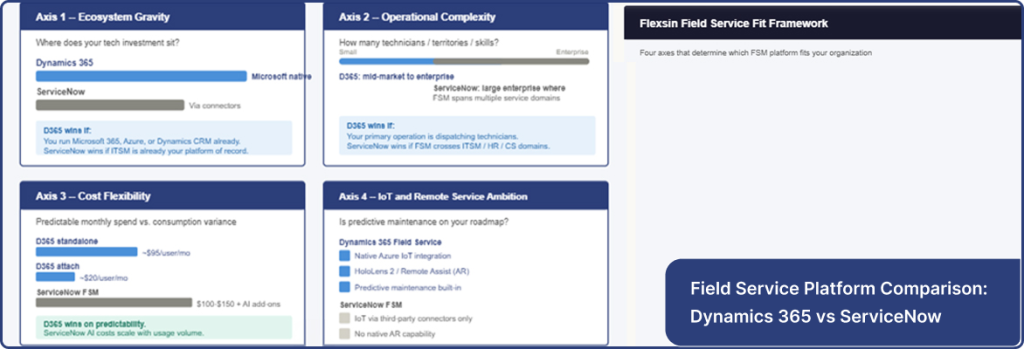
The Flexsin Field Service Fit Framework
At Flexsin, we evaluate FSM platform decisions using a four-axis model built from enterprise deployment patterns across manufacturing, utilities, and professional services clients.
Axis 1 – Ecosystem Gravity
Where does your organization’s existing technology investment sit? Microsoft-heavy environments – those already running Microsoft 365, Azure, or Dynamics CRM – experience dramatically faster time-to-value with Dynamics 365 Field Service because the integration architecture is already in place. ServiceNow makes more sense when ITSM is the organizational nervous system and field service is a downstream function of that operation.
Axis 2 – Operational Complexity
How many technicians, territories, and skill specializations are you scheduling simultaneously? Dynamics 365 handles this well at mid-market scale. ServiceNow consulting services’ workflow automation depth starts to differentiate at enterprise scale – specifically for organizations where field service intersects with HR service delivery, IT asset management, and customer operations in the same ticket lifecycle.
Axis 3 – Cost Flexibility
Fixed pricing favors Dynamics 365. Consumption-based pricing introduces variance with ServiceNow’s AI layer – and at 200+ users, that variance becomes a budget conversation your finance team doesn’t want to have mid-year. For organizations that need predictable monthly costs, the difference matters more than any feature comparison.
Axis 4 – IoT and Remote Service Ambition
If predictive maintenance – using sensor data to detect equipment failures before they occur – is on your roadmap, Dynamics 365 Field Service has a material lead. Its native Azure IoT integration and HoloLens 2 / Remote Assist capabilities for augmented reality-guided repairs are built-in advantages ServiceNow doesn’t match without significant third-party investment.
The Data: What Real Deployments Show
According to TechTarget’s recent field service management analysis, Dynamics 365 Field Service’s IoT and augmented reality capabilities for remote diagnostics and guided repairs represent a genuine differentiator in the current FSM landscape – not a marketing claim. In the Customer Support Services market, ServiceNow holds a 9.78% market share (ranked 2nd) against Dynamics 365 Field Service’s 3.06% (ranked 4th) according to 6sense market data – but that gap reflects ServiceNow’s ITSM installed base, not FSM-specific adoption.
What nobody says out loud is this: ServiceNow’s field service numbers are inflated by organizations that added FSM to an existing ITSM contract rather than choosing it for field operations. Remove those deployments and the adoption picture looks considerably more balanced. Most enterprise field service organizations evaluating both platforms fresh – without a prior ServiceNow investment – choose Dynamics 365.
The Flexsin Take:
Flexsin’s Microsoft Dynamics 365 practice has deployed field service solutions for manufacturers, utilities, and professional services firms across North America and Europe. In each engagement, the same pattern holds: organizations that enter the evaluation with an existing Microsoft investment see a stronger ROI case for Dynamics 365 Field Service, and the deployment timeline is typically 30-40% shorter than comparable ServiceNow FSM engagements. A mid-sized HVAC service company – 180 technicians across six US states – went live on Dynamics 365 Field Service in 14 weeks, with the AI scheduling optimization reducing dispatch time by 22% in the first quarter after go-live.
ServiceNow remains the right answer for one specific context: the large enterprise where field service is one of five or six operational domains all running on the Now Platform. In that scenario, consolidation on a single platform has genuine value. Outside that scenario, the complexity and cost premium are harder to justify.
Where It Gets Harder
- Dynamics 365 Field Service requires a Microsoft 365 subscription as a prerequisite – an additional cost for organizations not already in the Microsoft ecosystem.
- The platform’s maximum of 300 named users is a real constraint for large enterprises with significant field operations – a ceiling ServiceNow doesn’t have.
- ServiceNow’s product roadmap scores higher on G2 (8.8 vs 7.7), suggesting stronger long-term platform investment – something worth weighing in a multi-year commitment.
- Both platforms have steep learning curves for new dispatchers. ServiceNow’s complexity is broader; Dynamics 365’s complexity is more field-operation-specific.
- Neither platform is an ERP. Both require integration with a financial system for job costing, revenue recognition, and inventory posting – a cost that belongs in the TCO calculation regardless of which platform you choose.
People Also Ask
Is Dynamics 365 Field Service the same as ServiceNow FSM?Dynamics 365 Field Service is purpose-built for field operations; ServiceNow FSM extends an enterprise workflow platform into field territory. The two platforms serve the same surface need from fundamentally different origins.
Which is cheaper: Dynamics 365 Field Service or ServiceNow?Dynamics 365 Field Service is typically less expensive. Standalone pricing starts at ~$95/user/month; ServiceNow FSM fulfillers cost $100-$150/user/month before AI add-ons and implementation consulting.
Does Dynamics 365 Field Service work with ServiceNow?Power Automate triggers ServiceNow workflows from Dynamics 365 events; ServiceNow’s Yokohama release expanded IntegrationHub spokes for Microsoft tools.
Can small businesses use Dynamics 365 Field Service?Yes, with no minimum user requirement. ServiceNow typically targets mid-to-large enterprises with contracts starting at $10,000-$30,000 annually before implementation costs.
The platform decision you make today will shape your field service operation for the next three to five years. Flexsin’s Microsoft Dynamics 365 practice helps service organizations select, configure, and deploy the right FSM solution – without the cost surprises that derail most enterprise implementations.
If you’re evaluating Dynamics 365 Field Service or ServiceNow FSM, Flexsin offers a no-obligation fit assessment to map your service operations against both platforms before you commit. Talk to a Flexsin’s Dynamics 365 specialist today.

What Leaders Ask Us
1. What is Dynamics 365 Field Service used for?It manages work orders, dispatches technicians, tracks assets, and optimizes schedules using AI. It’s designed for organizations that run on-site service operations.
2. Is ServiceNow a field service management tool? ServiceNow offers FSM capabilities as part of its broader enterprise platform. It’s not purpose-built for field operations but extends well when ITSM is already in use.
3. How much does Dynamics 365 Field Service cost per user?Standalone pricing is approximately $95/user/month. As a Microsoft attach license for existing Dynamics users, it can drop to $20/user/month.
4. What is the ServiceNow FSM implementation cost?Implementation consulting typically runs $150,000 to $450,000+ for initial deployment. Ongoing admin, non-production instances, and AI add-ons are additional costs.
5. Does Dynamics 365 Field Service have an AI scheduling feature?Copilot-based scheduling is included in the standard offering. The Resource Scheduling Optimization add-on for automated dispatch costs $30/user/month additional.
6. What is the difference between ServiceNow ITSM and ServiceNow FSM? ITSM handles IT service workflows internally. FSM extends the platform to manage field technicians, work orders, and on-site service delivery for external customers.
7. Can Dynamics 365 Field Service integrate with IoT sensors?Native Azure IoT integration enables real-time equipment monitoring and predictive maintenance scheduling. ServiceNow requires third-party connectors for comparable IoT functionality.
8. Which platform is better for mid-sized field service companies?Dynamics 365 Field Service is generally the stronger fit. Lower implementation cost, Microsoft ecosystem integration, and no minimum user floor make it more accessible.
9. Does ServiceNow FSM support offline mobile use for technicians?The ServiceNow mobile app supports offline capabilities. Some G2 reviewers in field-heavy roles report occasional connectivity lag compared to Dynamics 365 Field Service Mobile.
10. What is the maximum number of users in Dynamics 365 Field Service?Microsoft caps named users at 300. Organizations requiring more users should evaluate ServiceNow or consider Dynamics 365 in a hybrid configuration with a partner.