

 +1.844.3539.746
 info@flexsin.com
7 High-Value Salesforce Integrations That Help SMBs Achieve More With Less
 Mahendra Singh Panwar
Let's talk
Table of Contents:
- Understanding the Unique Dynamics of Salesforce Integrations for SMBs
- The 7 Best Salesforce Integrations for SMBs
- Choosing the Right Salesforce Integrations for SMBs
- People Also Ask
- Ready to Build a Salesforce Integration Stack That Works?
- Frequently Asked Questions
Most SMBs don’t lose deals because their CRM is weak – they lose them because their CRM doesn’t talk to anything else. Salesforce is the world’s number one CRM, a position it has held for eleven consecutive years according to IDC, yet the platform’s real productivity lift comes from what you connect to it, not from the core product alone.
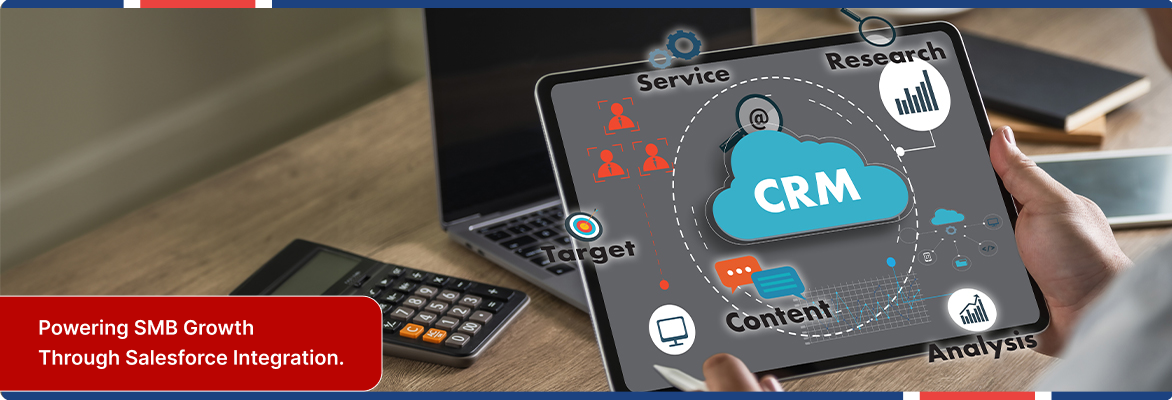
For small and mid-sized businesses running lean teams across sales, marketing, finance, and operations, the right Salesforce integrations for SMBs transform a record-keeping system into an end-to-end revenue engine.
The challenge is selection. The AppExchange lists over 7,000 apps. That number is paralyzing when your team has limited bandwidth and zero room for integrations that need six months to configure. This list cuts through that noise.
Understanding the Unique Dynamics of Salesforce Integrations for SMBs
Enterprise teams can absorb integration complexity through dedicated IT staff and multi-year rollout plans. Small businesses cannot. That is why the best Salesforce integrations for small businesses share a common trait: they deliver value within days, not quarters. They use certified connectors on AppExchange, require minimal custom code, and operate on bidirectional sync so data flows both ways without manual reconciliation.
The 7 Best Salesforce Integrations for SMBs
1. QuickBooks – Close the Gap Between Sales and Finance
Nothing kills post-sale momentum like manually re-entering closed deal data into your Salesforce accounting system. The Salesforce QuickBooks integration eliminates that entirely. When an opportunity closes in Salesforce, a QuickBooks invoice can generate automatically – customer record, line items, billing address and all.
The practical upside goes beyond invoice creation. Finance teams gain visibility into pipeline status without needing a Salesforce license. Sales reps can confirm payment status before a renewal conversation without calling accounting.
2. Mailchimp – Turn CRM Data Into Campaigns That Convert
Marketing without CRM context is guesswork. The Salesforce Mailchimp integration bridges that gap by syncing contact records, lead status, and activity history directly into your Salesforce email marketing integration platform. Marketers can build segmented audiences based on actual CRM behavior – deal stage, last contact date, product interest, rather than imported spreadsheets that are stale before they’re even uploaded.
HubSpot’s 2026 State of Marketing Report found that 82% of marketers say disconnected data between CRM and marketing platforms limits their ability to personalize campaigns and measure ROI.
3. Slack – Real-Time Deal Intelligence Without the Dashboard Login
Slack is already where most SMB teams live. Connecting it to Salesforce means deal alerts, lead assignments, and pipeline changes reach the right people instantly – without anyone needing to check a dashboard. The Salesforce Slack integration SMB use case is particularly strong for distributed or hybrid teams where speed of internal communication determines whether a hot lead gets followed up in two hours or two days.
Slack channels can be configured to receive automated notifications when high-value opportunities are created, when a deal stage changes, or when a key account goes inactive. Sales managers get pipeline visibility without scheduling a status meeting.
4. DocuSign – Contracts That Close While the Buyer’s Attention Is Still on You
Deals stall in contract review more than any other stage. The Salesforce DocuSign integration lets sales reps generate and send a contract directly from a Salesforce opportunity record – no file exports, no email attachments, no waiting for legal to pull a template. Signed documents route back automatically and attach to the correct Salesforce record.
For SMBs that close deals over video calls, this integration is a conversion accelerator. You can send a contract during the call, watch the signing status update inside Salesforce in real time, and close before the momentum fades. DocuSign’s standard plan runs $25 per user per month – a fraction of a single delayed deal’s cost.
5. Zapier – The Connective Tissue for Everything Else
Not every Salesforce integration for small businesses justifies a dedicated AppExchange connector or a developer project. That is exactly where Salesforce Zapier automation earns its place. Zapier creates workflow bridges between Salesforce and thousands of other applications – from project management tools to customer support platforms to internal databases.
A typical SMB workflow: when a Salesforce opportunity closes, Zapier automatically creates a project task in Asana, adds the customer to a Stripe subscription, and sends a welcome email via Gmail. None of that requires a single line of custom code.
6. HubSpot – When Marketing Runs on a Different Engine
Some SMBs reach a point where their marketing team wants HubSpot’s automation depth and their sales team refuses to leave Salesforce. The Salesforce HubSpot integration solves that tension without forcing a platform choice. Contacts, companies, deals, and engagement history sync bidirectionally.
This integration and Salesforce data sync for small businesses also handles deduplication intelligently: HubSpot removes duplicate company records based on the Salesforce Account ID, preventing the data hygiene degradation that plagues most dual-platform setups.
7. Tableau – Analytics That Ask Better Questions
Salesforce’s native reporting is solid for day-to-day pipeline tracking. It was not designed for cross-functional analysis that blends CRM data with marketing spend, support ticket volume, or financial performance. The Salesforce Tableau integration analytics capability fills that gap by connecting live Salesforce data to Tableau’s visualization and analytical engine.
For SMBs making pricing, expansion, or hiring decisions, this integration delivers something most small businesses never have: executive-quality analysis without an enterprise analytics team.
Choosing the Right Salesforce Integrations for SMBs
The ROI question comes before the feature question. Every integration in this list was selected because it eliminates a specific category of manual work or decision delay that costs small teams real time and revenue. Typical CRM implementations achieve positive ROI within 12 to 13 months according to multiple industry sources including Integrate.io – and the right integration of Salesforce CRM tool stack SMB accelerates that timeline considerably.
Start with the Salesforce Sales Cloud integration that solves your most painful data gap today. One well-implemented Salesforce integration for SMBs that the whole team actually uses is worth more than five half-configured connectors that create more confusion than they resolve.
People Also Ask:
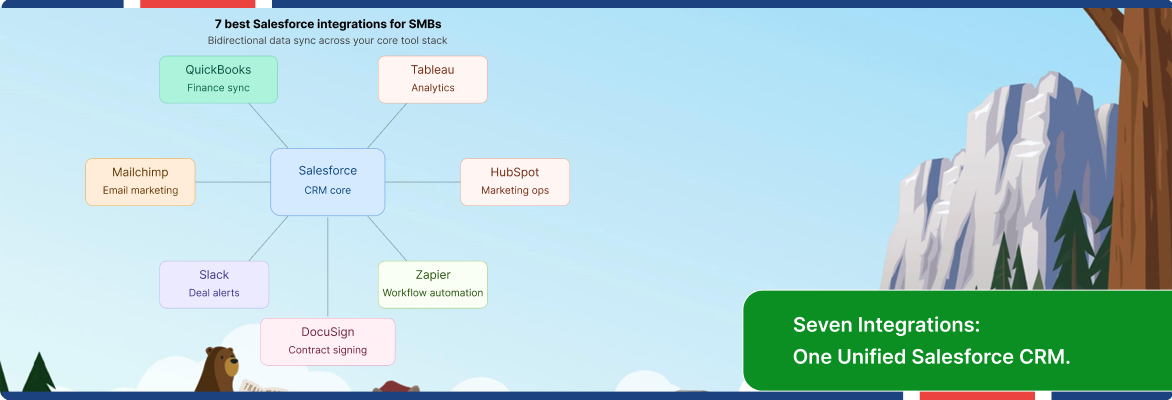
What are the best Salesforce integrations for small business teams?QuickBooks, Slack, Mailchimp, DocuSign, Zapier, HubSpot, and Tableau are consistently the highest-value choices for SMBs. Each solves a specific Salesforce workflow automation SMB gap rather than adding general features.
How does Salesforce Zapier automation work for SMBs? Zapier connects Salesforce to thousands of apps using trigger-and-action workflows – no code required. When something happens in Salesforce, Zapier automatically performs a corresponding action in another tool.
Is the Salesforce QuickBooks integration difficult to set up?Pre-built connectors on AppExchange such as Breadwinner or DBSync can be configured within hours. Custom API integrations exist for businesses with complex workflow requirements.
What does the Salesforce Slack integration do for sales teams? It delivers real-time pipeline alerts, deal stage changes, and lead notifications directly into Slack channels. Teams stay informed without logging into Salesforce throughout the day.
How do Salesforce integrations for SMBs improve ROI?They reduce manual data entry, eliminate inter-system delays, and give small teams enterprise-level automation capabilities. Industry research confirms most CRM integration for small businesses reach positive ROI within 12 to 13 months.
Ready to Build a Salesforce Integration Stack That Works?
Flexsin is a certified Salesforce partner with hands-on experience connecting CRM environments to the operational tools SMBs depend on daily. From QuickBooks and Mailchimp to custom API workflows, we architect integrations that fit your team’s real processes – not a generic template. Explore Flexsin’s Salesforce development and integration services, and talk to a specialist who has deployed these exact integrations across dozens of growing businesses.

Frequently Asked Questions:
1. Can SMBs integrate Salesforce without a development team? Yes. Most of the integrations in this list – including Zapier, Mailchimp, Slack, and QuickBooks – have certified connectors on AppExchange that require no custom code. A technically capable operations manager can configure most of them within a day using documented setup guides.
2. How many Salesforce integrations should an SMB run simultaneously? Start with two or three that directly address your highest-friction workflows. Adding too many integrations at once creates data conflicts and makes troubleshooting difficult. Expand incrementally once each integration is stable and actively used by the team.
3. Does Salesforce charge extra for third-party integrations? Salesforce itself does not charge for most AppExchange connections, but the third-party tools (QuickBooks, DocuSign, HubSpot, etc.) carry their own licensing costs. Some middleware tools like Zapier and Breadwinner also have subscription tiers based on data volume or workflow complexity.
4. What is the difference between native Salesforce integrations for SMBs and third-party connectors?Native integrations (like Slack and Tableau, which Salesforce owns) are built directly into the platform and update alongside Salesforce releases. Third-party connectors are built and maintained by independent vendors, including Salesforce AppExchange SMB tools, and may require separate versioning and support engagement.
5. How does the Salesforce DocuSign integration handle security? DocuSign is SOC 2 Type II certified and uses 256-bit AES encryption for document storage. Signed documents returned to Salesforce inherit Salesforce’s own object-level security model, so only users with appropriate permissions can access them.
