

 +1.844.3539.746
 info@flexsin.com
Why Most Business Central CRM Integration Decisions Miss The Mark
 Sudhir K Srivastava
Let's talk
Table of Contents:
- Basics of Business Central CRM integration
- The Integration Trap Most Teams Walk Straight Into
- Where Business Central CRM Integrations Most Commonly Break
- Flexsin’s Business Central CRM Integration Execution Framework
- Business Central CRM Integration: Flexsin in Practice
- What to Validate Before Committing to Business Central CRM Integration
- The True Cost of Decisions
- People Also Ask
- Common Questions Answered:
Your back office and your pipeline are speaking two different languages, and every day they don’t sync, you’re paying for the gap. Microsoft Dynamics 365 Business Central handles finance, inventory, and operations. The CRM handles deals, contacts, and pipeline. When both systems talk cleanly, finance stops chasing sales for numbers and sales stops re-entering orders. This guide identifies which CRM systems integrate with Business Central and what separates a clean connection from a costly one.
Here’s the uncomfortable truth: most CRM-ERP integrations fail not because the technology doesn’t work, but because the buying decision was made before the architecture question was ever asked. A mid-market distribution firm in Ohio connected HubSpot to Business Central using a generic Zapier workflow – only to discover six months later that closed deals weren’t creating sales orders because of a lifecycle stage mismatch. The rework cost more than the original implementation.
The global CRM market reached $112.91 billion in 2025, according to SellersCommerce, and is forecast to surpass $262 billion by 2032. That scale means the vendor ecosystem is crowded, and the integration options for Business Central are genuinely diverse, from Microsoft’s own Dynamics 365 Sales to Salesforce, HubSpot, Zoho, and Pipedrive. What’s not equally diverse is the quality of execution guidance. Most articles list the CRM options. This one tells you where each one breaks and what to validate before you choose.
The most important thing to understand upfront: Business Central has exactly one native, out-of-the-box CRM integration – with Dynamics 365 Sales. Every other CRM ERP Business Central integration on this list requires middleware, API configuration, or a third-party connector. That’s not a knock against those platforms. It’s a prerequisite you should price and plan for before you sign anything.
Basics of Business Central CRM Integration
- Business Central’s only native CRM integration is with Dynamics 365 Sales – all others require middleware or third-party connectors.
- The CRM market is growing at 11.5% CAGR over the coming years; every major vendor now claims Business Central compatibility, but integration depth varies sharply.
- Salesforce integrations cost more to maintain than HubSpot or Zoho but deliver more in complex multi-cloud environments.
- Data governance failures – not technical mismatches, cause the majority of Business Central CRM integration breakdowns.
- The right CRM for Business Central depends on whether your primary buyer is in sales, marketing, or finance – not on market share rankings.
The Integration Trap Most Teams Walk Straight Into
Every Microsoft Dynamics 365 Business Central CRM integration decision starts the same way. Someone in leadership asks which CRM is compatible with BC, and the answer they expect is a product name, not an architecture review. The sales team wants Salesforce. Marketing wants HubSpot. Finance wants whichever one has the cleanest sync with invoicing. And the IT team, understaffed and under-scoped, agrees to make it work after the decision is made. That sequence for Salesforce Business Central integration is a trap.
Why the Sequencing Matters
The architecture question – how data will flow between systems, who owns each record, and what triggers synchronization, must come before vendor selection. CRM platforms sync with Business Central across three primary models: native connectors (Dynamics 365 Sales only), middleware platforms like Azure Logic Apps and Power Automate, and third-party iPaaS tools such as Rapidi or Celigo. Each model carries a different cost structure, maintenance burden, and failure mode. Choosing Salesforce and then discovering that your integration budget can’t support a proper iPaaS tool is a lesson that costs real money.
The clear answer is that no CRM, be it Power Automate Business Central CRM or others, integrates with Dynamics 365 Business Central system effortlessly – except Dynamics 365 Sales. The others work, often very well, but only when the HubSpot Business Central integration is designed rather than bolted on.
CRM-ERP Compatibility Matrix: How the Top CRM Platforms Connect to Business Central
| CRM | Native BC Connector | Integration Method | Best Fit | Key Limitation |
|---|---|---|---|---|
| Dynamics 365 Sales | Yes (built-in) | Native / Power Platform | Microsoft-stack enterprises | Requires D365 Sales license |
| Salesforce | No (third-party) | Middleware / iPaaS | Complex multi-cloud orgs | Higher integration cost & effort |
| HubSpot | No (third-party) | API / Power Automate | SMB marketing-led teams | Lifecycle alignment complexity |
| Zoho CRM | No (third-party) | API / Zapier / iPaaS | Cost-conscious SMBs | Limited enterprise governance |
| Pipedrive | No (third-party) | API / Zapier | Pure sales-process teams | Thin analytics depth |
Where Business Central CRM Integrations Most Commonly Break
Technical compatibility is almost never the problem. Every major CRM platform offers Business Central API integration and access, and Business Central’s RESTful OData APIs are well-documented. What breaks integrations isn’t the connection itself, it’s what happens after the connection is established.
The Four Recurring Failure Patterns
- First, data ownership conflicts. Business Central and your CRM both want to be the system of record for customer information. Without explicit data governance in CRM integration rules – which system owns the address? who controls credit limits? Field-level conflicts corrupt data over time.
- Second, lifecycle stage mismatches. HubSpot defines contacts in marketing terms: leads, MQLs, SQLs. Business Central thinks in transaction terms: customers, vendors, contacts. Mapping those two models requires deliberate design, not defaults. A 2025 Pacific Journal of Business Innovation study found that companies connecting ERP and CRM correctly saw 25% higher service quality but only when the data architecture was designed upfront, and CRM integration data failure reasons addressed.
- Third, trigger logic gaps. When should a closed-won deal in the Zoho CRM Business Central integration automatically create a sales order in Business Central? When should a credit hold in BC block a deal from progressing in the CRM? These aren’t default behaviors in any integration and lifecycle stage mismatch for CRM ERP They’re configurations that need to be specified and tested.
- Fourth, and this one nobody talks about out loud for Business Central OData API integration – scope creep after go-live. Integration projects rarely end at go-live. New fields, new modules, new workflows get added. If the integration wasn’t built with extensibility in mind, each addition becomes a mini-project. That’s the real long-term cost that most integration proposals don’t surface.
Flexsin’s Business Central CRM Integration Execution Framework
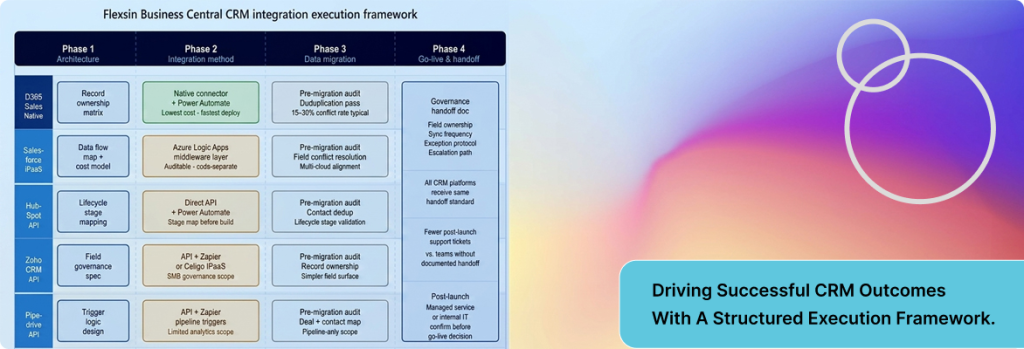
Flexsin’s approach to Business Central CRM integration follows a four-phase model built specifically for mid-market businesses that can’t afford a six-month implementation runway.
Phase 1: Architecture Before Vendor
Before any CRM is evaluated, Flexsin maps the data flows between sales, finance, and operations. This phase produces a record ownership matrix, a document that explicitly states which system controls each data entity and what happens when both systems hold a version of the same record. Most implementation partners for best CRM for Business Central skip this step. Most integration failures trace back to skipping it.
Phase 2: Integration Method Selection
For Dynamics 365 Sales, the native connector is used as the default, extended with Power Automate for custom workflow triggers. For Salesforce, the preferred approach is a middleware layer using Azure Logic Apps, which keeps integration logic separate from application code and makes it auditable. For HubSpot and Zoho, a combination of direct API calls and Power Automate connectors is used, with lifecycle stage mapping documented before a single workflow is built. This phase also surfaces the integration budget reality: a well-built Salesforce-BC integration costs roughly two to three times more to implement and maintain than an equivalent HubSpot-BC connection.
Phase 3: Governed Data Migration
Moving existing customer and order data into a connected system without creating duplicates or ownership conflicts requires a structured deduplication pass before migration, not after. Flexsin runs a pre-migration audit Business Central data sync errors that flags every record where the CRM and ERP disagree on customer data. That audit typically surfaces 15 to 30 percent of records with some form of conflict – a number that surprises most clients who assumed their data was clean.
Phase 4: Go-Live and Governance Handoff
Go-live is not the end of the project. Flexsin’s Dynamics 365 consulting services deliver a governance handoff document at go-live that specifies field ownership, sync frequency, exception handling protocols, and the escalation path for integration errors. Teams that receive this document about CRM ERP integration challenges have measurably fewer post-launch support tickets than those that don’t. The difference is documentation, not technology.
Business Central CRM Integration: Flexsin in Practice
Flexsin’s Microsoft Dynamics 365 Business Central consultants have implemented Business Central CRM integrations across manufacturing, professional services, and distribution sectors in North America. In one engagement with a mid-sized manufacturer in the Midwest – 150 employees, operating across three distribution channels, the team connected Dynamics 365 Sales to Business Central using the native connector, then extended it with Power Automate workflows to automate sales order creation on deal closure.
Quote-to-order cycle time dropped from four days to under six hours. The change wasn’t driven by a new tool. It was driven by a governance model for Business Central integration issues that eliminated the approval bottleneck that had lived in a shared inbox for three years.
Flexsin’s Dynamics 365 CRM consulting services and Microsoft Dynamics 365 Business Central consulting practice are designed to work together, not as separate engagements. CRM and ERP aren’t separate technology problems. They’re two layers of the same revenue architecture. What matters is getting both of them to agree on the same version of a customer.
What to Validate Before Committing to Business Central CRM Integration
Before signing a CRM contract, run this validation sequence against your Business Central environment and your business requirements.
Technical Prerequisites
- Confirm your Business Central version support for Azure Logic Apps CRM integration in the required API endpoints (BC 19+ supports OData v4, which most modern integrations require).
- Identify whether your CRM candidate offers a certified BC connector on Microsoft AppSource, or whether you will need a custom integration layer.
- Assess your Power Platform licensing – Power Automate Premium is required for many advanced CRM-BC workflows and is frequently missed in budget planning.
Data Prerequisites
- Run a customer data audit to identify duplicates, incomplete records, and field mismatches between your existing system of record and Business Central.
- Define record ownership for every entity that will sync across systems before the integration is built.
- Document the business events that should trigger cross-system actions – deal closure, credit hold, invoice overdue, new contact creation, and confirm the integration can handle each one.
Commercial Prerequisites
- Get a total CRM integration with Business Central cost estimate for Pipedrive Business Central integration that includes the middleware subscription, custom development, testing, and the first 12 months of maintenance, not just the CRM license fee.
- Evaluate whether your internal IT team has the bandwidth to manage the integration post-go-live, or whether you will need a managed service partner.
The True Cost of Decisions
This section on Business Central CRM integration guide is non-negotiable. Every CRM-BC integration has trade-offs that most vendor materials won’t surface.
Dynamics 365 Sales is the right answer for Microsoft-stack enterprises, but it requires a separate Dynamics 365 Sales license, and the total cost of the Microsoft ecosystem is higher than most CRM-only alternatives. If your team only needs contact management and pipeline tracking, the cost differential is hard to justify.
Salesforce delivers the integration capabilities in complex multi-cloud environments, but it’s expensive to implement well and expensive to maintain. The AppExchange ecosystem offers Business Central connectors, but not all of them are production-grade. Qualification matters more than availability.
HubSpot is the right choice for marketing-driven SMBs – but the data model alignment between HubSpot’s lifecycle stages and Business Central’s transaction model requires deliberate design work. It doesn’t happen by default, and generic connectors often get it wrong.
Zoho CRM works for cost-conscious teams, but enterprise-grade governance is harder to implement and maintain. For businesses with complex revenue operations, the savings on license fees can be offset by higher integration complexity costs.
People Also Ask:
Does Dynamics 365 Business Central have a built-in CRM?
Business Central includes basic contact and lead management capabilities. Full CRM functionality requires integration with Dynamics 365 Sales or a third-party CRM.
Can Salesforce integrate with Microsoft Business Central?
Salesforce integrates with Business Central via middleware tools such as Azure Logic Apps, Power Automate, or certified iPaaS connectors. No native connector exists.
What is the easiest CRM to integrate with Business Central?
Dynamics 365 Sales is the easiest due to its native connector. Among third-party CRMs, HubSpot has a simpler data model than Salesforce, which can reduce integration complexity.
How much does a Business Central CRM integration cost?
Costs vary widely: a Dynamics 365 Sales integration typically ranges from $10,000–$40,000. Salesforce integrations often run $30,000–$100,000 depending on complexity and middleware.
Ready to connect your CRM to Business Central without the rework?
Flexsin’s Microsoft Dynamics 365 Business Central consulting team has implemented CRM-ERP integrations across manufacturing, distribution, and professional services sectors in North America. We start with architecture – not vendor selection, so your integration is built to last, not rebuilt in 18 months.
Talk to a Flexsin Business Central consultant today.
Common Questions Answered:
1. What CRM systems work with Dynamics 365 Business Central? Dynamics 365 Sales integrates natively. Salesforce, HubSpot, Zoho, and Pipedrive connect via middleware or API, each requiring configuration beyond a basic connector.
2. Is HubSpot compatible with Microsoft Business Central? Yes, HubSpot connects to Business Central using Power Automate or third-party iPaaS tools. Lifecycle stage mapping must be configured manually.
3. Does Zoho CRM integrate with Business Central? Zoho CRM integrates via API and third-party connectors like Zapier or Celigo. It is suited to cost-focused SMBs with simpler integration requirements.
4. What is the difference between Dynamics 365 Sales and Business Central? Business Central is an ERP for finance, operations, and supply chain. Dynamics 365 Sales is a standalone CRM for pipeline and customer management, and the two integrate natively.
5. How long does a Business Central CRM integration take? A Dynamics 365 Sales integration typically takes 6–10 weeks. Salesforce integrations can take 12–20 weeks depending on data complexity and custom workflow requirements.
6. Can I use Power Automate to integrate CRM with Business Central? Yes, Power Automate is a common integration layer for HubSpot and Zoho. Complex Salesforce integrations typically require Azure Logic Apps or a dedicated iPaaS platform.
7. What data syncs between CRM and Business Central? Typically: customer records, contacts, sales orders, quotes, invoices, and inventory data. The exact sync scope depends on the CRM platform and the integration design.
8. Is Dynamics 365 Business Central a CRM or ERP? Business Central is an ERP that includes basic CRM features but is not a full CRM. Most businesses pair it with a dedicated CRM for complete customer lifecycle management.
9. What is the best CRM for a small business using Business Central? For Microsoft-invested teams, Dynamics 365 Sales is the natural fit. For marketing-led SMBs or budget-constrained teams, HubSpot and Zoho CRM are the stronger alternatives.
10. Does Microsoft AppSource have Business Central CRM connectors? Yes, AppSource lists certified connectors for several CRM platforms. Connector quality varies – production-grade qualification and vendor support history should be verified before selection.
