

 +1.844.3539.746
 info@flexsin.com
 Ashish Vaswani
When a nonprofit network across 40 countries modernizes its digital foundation, disciplined execution determines success. A strategic Salesforce Experience Cloud Implementation can remove login friction, enable zero downtime migration, and consolidate thousands of users within a secure, scalable Salesforce community portal.
Unlike commercial enterprises, nonprofit ecosystems serve volunteers and coordinators with occasional access and limited support budgets. For over 15,000 professionals on a legacy PHP system, password fatigue and security risks drove the shift to Salesforce Experience Cloud to modernize identity and reduce operational strain without disrupting global access.
Why a Salesforce Experience Cloud Implementation Becomes Mission Critical at Global Scale
A 40-country network introduces complexity in compliance, authentication, support coverage, and infrastructure reliability. A Salesforce Experience Cloud Implementation is not just a portal build. It is an enterprise cloud migration decision.
It must accommodate regional data regulations, varied user behaviors, and time zone–driven support models. Identity governance and user authentication configuration become foundational, not optional. Without architectural discipline, global scale amplifies risk instead of delivering operational efficiency.
From Fragmented Access to a Unified Salesforce Community Portal
The organization required a single Salesforce community portal that could serve multiple user roles while integrating with Salesforce CRM integration workflows. Data from the legacy platform needed structured mapping into Salesforce objects. Historical integrity could not be compromised.
This was more than UI replacement. It was legacy system migration to cloud with governance built in.
Identity as the First Transformation Layer
The largest friction point was login. Occasional access meant forgotten passwords. Global volunteers worked across time zones. Reset tickets consumed IT bandwidth. Passwordless authentication became the pivot.
Instead of traditional credentials, the architecture implemented passwordless login using email-based one-time codes. This decision aligned usability with security. It reduced cognitive load while strengthening identity verification.
Designing the Architecture Behind the Salesforce Experience Cloud Implementation
A Salesforce Experience Cloud Implementation demands architectural clarity. The objective was measurable – under 30-second login, zero downtime migration, and elimination of password-related support cases.
To achieve this, identity workflows, data models, and integration layers were defined before development began. Every configuration decision was aligned to performance benchmarks and security standards. Scalability was engineered into the foundation to support future expansion without rework.
User Authentication Configuration and Security Controls
The authentication layer required structured user authentication configuration inside Salesforce Experience Cloud. Email verification was enabled. OTP expiration windows were calibrated to balance risk and usability. Retry limits were defined.
Email infrastructure was hardened with proper domain authentication protocols. Deliverability testing was conducted across global providers. This ensured passwordless login functioned reliably across continents.
Cloud Migration Strategy and Data Integrity
The cloud migration strategy followed a two-stream model:
Data transformation and validation
Communication and change enablement
Data was extracted from MySQL structures and mapped into Salesforce CRM integration layers. Duplicate detection logic was automated. Parallel validation runs ensured full history preservation.
The enterprise cloud migration avoided downtime by executing staged cutovers. Regional rollout waves ensured continuity.
Evaluating Authentication Options During the Salesforce Experience Cloud Implementation
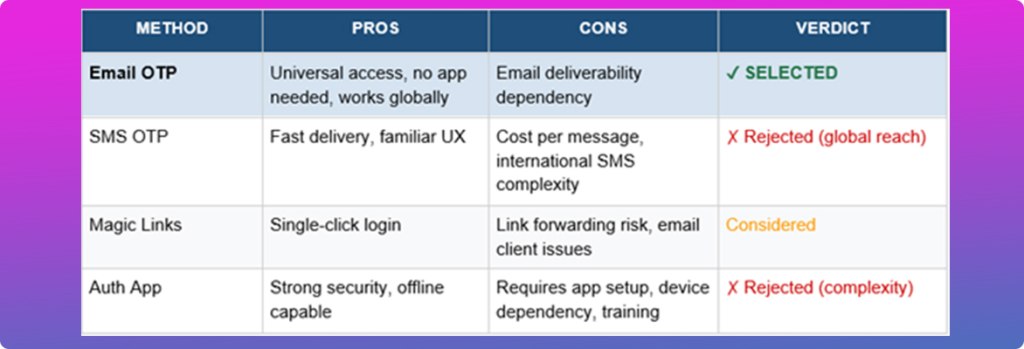
Selecting passwordless authentication was not impulsive. Multiple options were evaluated within the Salesforce Experience Cloud Implementation roadmap.
Each method was assessed against usability, global accessibility, security exposure, and operational cost. Email OTP delivered the optimal balance for Salesforce for nonprofits operating globally. The final choice aligned with enterprise scalability requirements while minimizing friction for occasional users.
Operational Outcomes of the Salesforce Experience Cloud Implementation
Transformation must translate into metrics. This Salesforce Experience Cloud Implementation produced measurable improvements.
– 15,000 plus users migrated
– Login completion under 30 seconds
– 100 percent elimination of password reset tickets
– Zero downtime migration
These outcomes were not incidental. They were engineered.
Role-Based Support Optimization
User segmentation improved support routing. Faculty and network members accessed distinct modules. Queries were categorized accordingly. This reduced support resolution times.
Clear role definitions by Salesforce consulting services also enabled targeted documentation and guided self-service resources within the Salesforce community portal. As a result, escalation rates declined and regional support teams operated with greater efficiency and accountability.
Digital Transformation for Nonprofits in Action
Beyond login improvements, the Salesforce implementation services engagement modernized the operating model. Data visibility improved. Volunteer engagement increased. Governance controls strengthened.
Cross-functional teams gained real-time insights through structured Salesforce CRM integration, enabling faster decision-making. The Salesforce Experience Cloud Implementation ultimately aligned technology with mission delivery, creating a scalable foundation for long-term growth.
What Most Enterprises Overlook in a Salesforce Experience Cloud Implementation
In our Salesforce consulting services practice, we see a recurring pattern. Organizations focus on front-end design and ignore identity, data hygiene, and communication planning.
Our Flexsin Enterprise Identity Framework follows three principles:
Remove friction first
Validate data before migration
Communicate change in phased waves
A Salesforce Experience Cloud Implementation succeeds when identity strategy and migration engineering move together.
When authentication design is separated from data migration planning, friction and risk multiply. Aligning identity architecture with enterprise cloud migration ensures security, usability, and operational continuity are achieved simultaneously.
End-to-End Model for Legacy System Migration to Cloud
For US SMB and enterprise leaders evaluating Salesforce migration services, the progression should follow five stages:
– Strategic validation
– Architecture blueprinting
– Controlled data migration
– User authentication configuration
– Post-launch optimization
Each stage must contain defined metrics and rollback safeguards. Clear ownership, governance checkpoints, and measurable KPIs should be embedded at every phase to prevent scope drift. When executed with discipline, this structured approach transforms a Salesforce Experience Cloud Implementation from a technical upgrade into a strategic growth enabler.
A Salesforce Experience Cloud Implementation is not simply a platform upgrade. It is a redefinition of access, governance, and digital engagement across global ecosystems. When identity modernization, enterprise cloud migration discipline, and user-centered design converge, transformation becomes measurable and sustainable.
If your organization is evaluating secure platform modernization or requires cyber threat intelligence solutions aligned with your Salesforce Experience Cloud Implementation, connect with Flexsin to design a transformation roadmap grounded in resilience and operational clarity.
Frequently Asked Questions
1. What is a Salesforce Experience Cloud Implementation?A Salesforce Experience Cloud Implementation is the structured deployment of a secure digital portal that connects external users to CRM data, workflows, and services in a controlled environment.
2. Why is passwordless authentication important in global deployments?Passwordless authentication reduces reset tickets, improves security posture, and minimizes user friction across distributed user bases. It eliminates dependency on memorized credentials, which are often weak or reused across systems.
3. How does zero downtime migration work?Zero downtime migration uses phased cutovers, parallel validation, and rollback planning to ensure uninterrupted access during platform transition. Legacy and new environments run simultaneously until data accuracy and performance benchmarks are validated.
4. Is Salesforce suitable for nonprofits?Salesforce for nonprofits offers structured CRM capabilities, donor management, volunteer tracking, and governance controls tailored to mission-driven organizations. It supports grant tracking, impact measurement, and stakeholder engagement within a single ecosystem.
5. What are the risks of legacy system migration to cloud?Risks include data loss, duplicate records, integration errors, and user adoption challenges if migration governance is weak. Poor identity mapping can also create access inconsistencies and compliance exposure.
6. How long does a Salesforce Experience Cloud Implementation take?Timelines vary, but enterprise implementations typically span several months depending on data complexity and compliance needs. Factors such as integration depth, authentication configuration, and regional rollout planning influence duration.
7. What makes email OTP effective for enterprise cloud migration?Email OTP requires no additional hardware or app installation, making it universally accessible across regions. It simplifies onboarding during a Salesforce Experience Cloud Implementation by reducing user training requirements.
8. How does Salesforce CRM integration support volunteer networks?It centralizes profiles, activity logs, and credential records within a single source of truth. This enables administrators to monitor engagement patterns and maintain compliance documentation efficiently. Integration also reduces manual reconciliation between disconnected systems.
9. What defines a strong cloud migration strategy?Clear staging, automated validation, governance checkpoints, and structured communication plans define success. Strong strategies align technical execution with business continuity planning. Metrics such as login success rates and data accuracy benchmarks should guide each transition phase.
10. When should enterprises engage Salesforce consulting services?Engagement is advisable during early architecture validation to prevent rework and ensure scalability. Experienced Salesforce consulting services partners help define migration sequencing, authentication models, and risk controls.