

 +1.844.3539.746
 info@flexsin.com
The 5 Odoo ERP Implementation Realities Most Businesses Ignore Until It’s Too Late
 Munesh Singh
Let's talk
Table of Contents:
- Reality 1 – Community vs. Enterprise: Architecture Question
- Reality 2 – Odoo Hosting Options Are Not a Commodity Decision
- Reality 3 – The Real Odoo ERP Implementation Cost
- Reality 4 – Customization Debt Accumulates Faster Than You Think
- Reality 5 – Odoo Module Selection Determines Your Long-Term TCO
- How Flexsin Delivers Odoo ERP Implementation Success
- Odoo ERP Integration: Key Technical Considerations
- Related Questions
- Ready for Odoo Implementation Without the Costly Surprises?
- Common Questions, Clear Answers
Most Odoo ERP implementations that go over budget don’t fail on the platform – they fail on what leadership didn’t know before signing anything. The licensing page makes it look clean. One user count, one monthly rate, a few module options. What it doesn’t show is the hosted infrastructure bill, the data migration bill, or the support contract you’ll absolutely need three weeks post-launch when something unexpected surfaces in production.
Studies from implementation consultancies show the average Odoo project runs 56% over budget due to hidden costs. That figure isn’t surprising to anyone who has shipped a real ERP deployment. It’s the predictable result of a planning process that treats software procurement like a SaaS subscription. Odoo ERP implementation is a system change – and system changes have second and third-order costs that no pricing calculator surfaces automatically.
Five things will determine whether your Odoo investment performs or becomes a costly lesson. None of them are secret. All of them are under-discussed in the material most vendors produce.
Reality 1 – Community vs. Enterprise: Architecture Question
The first fork in every Odoo ERP implementation decision is edition – and most teams approach it as a budget line item rather than an architectural commitment. That framing causes persistent downstream problems.
Odoo Community is fully open source under LGPLv3, free to download, with zero license fees. That fact leads a surprising number of growing companies to default to it without thinking through total cost of ownership. The license is free; the infrastructure, upgrade cycles, and custom development to replicate Enterprise-only capabilities are not. Odoo Enterprise currently costs roughly $24-$37 per user per month depending on plan, and it bundles features that Community teams routinely spend equivalent sums building from scratch.
The critical insight here is what Odoo Studio actually does for Enterprise users. It handles 70-80% of common customization requests without touching the core codebase. Those changes are stored as metadata rather than hard-coded modifications, which means they survive version upgrades without refactoring. Community deployments that replicate this through custom development accumulate what practitioners call technical debt – code that must be manually retested and updated each time a new Odoo version ships.
Community is the right choice if your team has genuine in-house technical capability, a stable set of requirements that won’t evolve rapidly, and the appetite to manage infrastructure, upgrades, and support independently. Enterprise is the right choice for virtually everything else. The upgrade path runs one direction with relative ease – Community to Enterprise requires activating a license and installing Enterprise modules, with no data migration needed. The reverse involves significant trade-offs.
Reality 2 – Odoo Hosting Options Are Not a Commodity Decision
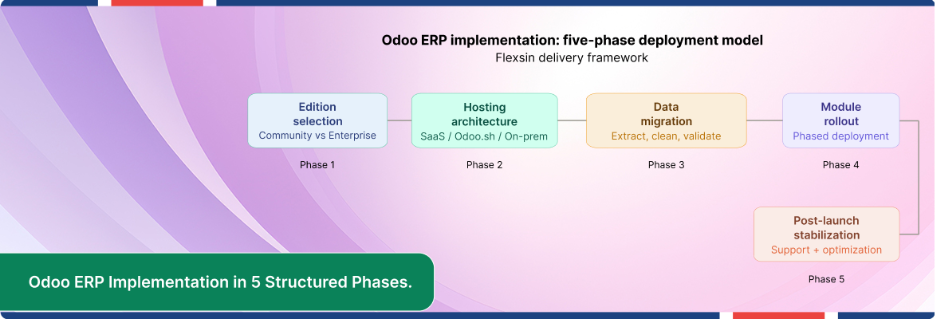
After edition, the most consequential early decision in any Odoo ERP implementation is where the system lives. Three paths exist: Odoo Online (SaaS), Odoo.sh (managed cloud), and on-premise self-hosting. Each carries trade-offs that bear directly on customization flexibility, security posture, and total operating cost.
Odoo Online (SaaS)
Fastest to launch. Zero infrastructure overhead. Automatic updates managed by Odoo S.A. The constraint is significant: customization is restricted to what the app store and configuration options allow. Organizations with complex or non-standard workflows often hit this ceiling within 12-18 months of adoption.
Odoo.sh (Managed Cloud)
The most practical balance for mid-market operators. You get staging environments, GitHub integration, built-in testing pipelines, and the ability to deploy custom modules – without the operational burden of running your own servers. Pricing scales by worker and storage rather than by user, which changes the cost calculus for teams with many occasional users. Most experienced Odoo implementation partners recommend this path as the default.
On-Premise Self-Hosting
Maximum control over data residency and infrastructure configuration. The cost that most teams underestimate here is not hardware – it’s the ongoing personnel cost of managing server security, backup integrity, failover architecture, and manual version upgrades. Organizations with specific regulatory requirements that mandate data sovereignty will find on-premise non-negotiable. Everyone else should evaluate it carefully against the hidden operational expense.

Reality 3 – The Real Odoo ERP Implementation Cost
Subscription pricing is the smallest part of what you will spend. This is the single most consistent thing practitioners observe across Odoo projects of every size, and it is the thing that the licensing page structurally cannot show you.
Data migration is almost always the most expensive line item that businesses fail to budget. It is not importing – it is extracting records from legacy systems, auditing data quality, mapping fields across schemas, validating against Odoo’s data model, and running reconciliation cycles until the numbers balance. If your legacy data is messy (and it usually is), every hour of pre-migration cleanup your internal team performs is an hour you are not paying a consultant to perform. This matters.
Customization carries compounding cost. The first modification feels inexpensive. The second feels similar. By the fifth, you are maintaining a custom module layer that must be regression-tested against every Odoo version upgrade. Experienced Odoo implementation consultants are consistent on this point: stick to standard Odoo wherever operationally possible. Every deviation from stock functionality is future maintenance liability.
Training costs are chronically underestimated. The weeks immediately following go-live are when users forget processes, discover gaps between configuration and workflow expectation, and generate support tickets that, without a post-launch stabilization budget, become production-environment problems. Reserve 10-15% of total project budget for post-go-live stabilization. Teams that treat the go-live date as the end of the budget are the ones that end up with expensive emergency support contracts.
Reality 4 – Customization Debt Accumulates Faster Than You Think
Every line of custom code added to an Odoo implementation is a line that needs to be tested, maintained, and re-validated at upgrade time. This is not theoretical – it is the documented root cause of the majority of Odoo ERP implementations that stall after initial deployment.
The pattern is recognizable. A business goes live with a fairly standard Odoo configuration. Within 90 days, the operations team identifies three workflow exceptions that don’t fit the default module behavior. A developer modifies the relevant Python logic. Six months later, Odoo releases a version update. The custom logic breaks against the new core module, and the development team has to assess compatibility before the upgrade can proceed.
The antidote is architectural discipline before the first line of custom code gets written. Ask whether a configuration change, a custom field via Studio, or a workflow rule solves the problem before escalating to code. In most cases, it does. The businesses that end up with the cleanest, most maintainable Odoo deployments are the ones that treat standard functionality as the baseline and customization as the measured exception – not the default response to every edge case.
This is also where the Community vs. Enterprise architecture decision resurfaces. Odoo Studio, available in Enterprise, keeps 70-80% of functional modifications in upgrade-safe metadata. Custom Python modules in Community deployments carry the full weight of version compatibility risk. That difference in maintenance cost profile accumulates meaningfully over a three-to-five-year deployment horizon.
Reality 5 – Odoo Module Selection Determines Your Long-Term TCO
Odoo’s modular architecture is its most cited strength and its most misunderstood planning variable. The platform currently ships with over 70 certified and integrable apps. That number creates an understandable impulse: activate broadly, configure later. In practice, activating modules you are not ready to configure and govern creates data inconsistencies, user confusion, and integration complexity that compounds quickly.
Module selection is, at its core, a change management decision. Each activated module represents a workflow change for the people who use it. Organizations that phase their Odoo ERP implementation – activating finance and inventory first, then sales and CRM, then manufacturing or eCommerce as operational readiness develops – consistently achieve faster user adoption and lower post-launch defect rates than organizations that attempt comprehensive simultaneous rollouts.
The other dimension of module selection that shapes long-term TCO is integration architecture. Odoo’s native integrations with third-party platforms – payment gateways, accounting software, eCommerce channels, shipping carriers – are well-documented and generally reliable. Custom integrations are not. Every external system you connect to Odoo through a custom API bridge is a connection that must be maintained through version upgrades on both sides.
How Flexsin Delivers Odoo ERP Implementation Success
Flexsin has delivered Odoo ERP implementation projects across healthcare, eCommerce, retail, manufacturing, and professional services. The pattern our team observes repeatedly is consistent: organizations that treat Odoo implementation as a platform deployment project rather than a business change initiative achieve lower post-launch defect rates, faster user adoption, and meaningfully better ROI on their implementation investment.
In one manufacturing engagement, post-implementation process automation reduced manual procurement, production, and inventory tasks by 40%. In a retail deployment, Odoo ERP integration with an eCommerce platform produced a 30% reduction in stockouts and a 25% improvement in customer satisfaction scores. Those outcomes were not the result of sophisticated customization – they were the result of disciplined module selection, clean data migration, and phased deployment that matched the operational readiness of the teams involved.
Our Odoo development team works across the full implementation lifecycle: module configuration, API integrations, data migration, custom module development where genuinely required, and post-go-live optimization. The single most valuable service we provide is helping leadership teams distinguish between what they actually need from Odoo and what they think they need – because those two things are rarely the same list on the first pass.
Odoo ERP Integration: Key Technical Considerations
No platform assessment is complete without an honest accounting of constraints. Odoo has several that affect planning decisions:
- Odoo Online (SaaS) restricts custom module deployment. Organizations with non-standard workflows will outgrow it.
- Community edition version upgrades are manual and require technical resource allocation. Without internal capability or a support partner, upgrade cycles get deferred – which creates compounding technical risk.
- Odoo.sh hosting costs scale by worker and storage allocation rather than by user. High-volume transaction environments should model this carefully before assuming linear cost scaling.
- Third-party app compatibility varies by Odoo version. Custom Odoo modules sourced from the Odoo App Store must be evaluated for version compatibility before each major upgrade.
- Multi-company configurations add complexity across accounting, inventory, and user access management. Organizations running more than two entities should treat multi-company setup as a distinct implementation workstream.
Related Questions:
What is the difference between Odoo Community and Odoo Enterprise? Community is free, open source, and self-hosted, while Enterprise adds licensed modules, official SLA-backed support, Odoo Studio, and assisted upgrades. Enterprise costs approximately $24-$37 per user per month depending on plan tier.
How much does Odoo ERP implementation cost for a mid-sized business? Total Odoo implementation cost depends on user count, module count, integration complexity, and customization scope. For mid-market organizations, the all-in cost including data migration, training, and stabilization typically runs well above the subscription fee alone.
Can I migrate from Odoo Community to Odoo Enterprise later? Yes – activating an Enterprise license and installing Enterprise modules requires no data migration and is a supported upgrade path. Moving from Enterprise back to Community is significantly more complex and involves loss of Enterprise-only module data.
What is the best hosting option for Odoo ERP? Odoo.sh is the recommended default for most mid-market deployments. It provides staging environments, GitHub integration, and custom module support without the operational overhead of on-premise infrastructure.
How long does an Odoo ERP implementation take? Simple deployments with limited module scope and clean data can go live in 8-12 weeks. Multi-department rollouts with custom integrations and complex data migration typically run 4-9 months.
Ready for Odoo Implementation Without the Costly Surprises?
The five realities covered in this guide are not theoretical – they are the consistent difference between Odoo ERP implementations that deliver ROI and ones that run over budget. The platform is capable. The implementation decisions are what determine the outcome.
Flexsin’s Odoo development team has delivered implementations across healthcare, manufacturing, retail, and professional services – from initial architecture through phased go-live and post-deployment optimization. Whether you are evaluating Odoo ERP for the first time or re-architecting an existing deployment that hasn’t performed, our team provides the technical depth and business context to get it right.
Explore Flexsin’s Odoo Development and Implementation Services →

Common Questions, Clear Answers:
1. Is Odoo ERP suitable for enterprise-scale businesses? Yes. Odoo Enterprise supports multi-company configurations, advanced accounting, and manufacturing modules that scale to enterprise workloads. The platform’s architecture has been deployed in organizations with hundreds of users across multiple geographies.
2. What is Odoo Studio and who should use it? Odoo Studio is a low-code customization environment available in Enterprise edition. It allows functional teams to add custom fields, modify views, and create workflows without writing Python code. These changes are stored as upgrade-safe metadata, making Studio the preferred customization method for the majority of business workflow modifications.
3. How does Odoo ERP compare to SAP on total cost of ownership? Odoo Enterprise licensing runs significantly lower than SAP Business One or NetSuite on a per-user basis. Implementation and customization cost structures are comparable. The TCO advantage of Odoo increases over time for organizations that maintain disciplined customization discipline and leverage Odoo Studio over custom code development.
4. What are the most common reasons Odoo implementations go over budget? the most consistent cost overruns trace to underestimated data migration complexity, unconstrained customization scope, insufficient user training budgets, and no post-launch stabilization reserve. Scoping these line items explicitly before project kickoff is the single highest-value planning investment a business can make.
5. Do I need an Odoo implementation partner or can I do it in-house? Self-implementation using Odoo’s documentation is viable for small businesses with strong technical capability and simple requirements. Mid-market organizations or anyone deploying more than three modules with live data migration should engage a certified Odoo implementation partner. The partner cost is consistently recovered through faster time-to-value and avoided post-launch remediation.
