

 +1.844.3539.746
 info@flexsin.com
Prepare and Succeed with the Microsoft Education Solutions Guide and Tenant Roadmap
 Sudhir K Srivastava
Let's talk
Table of Contents:
- Getting Started with the Microsoft Education Solutions Guide
- The Three Deployment Phases: What Each License Tier Unlocks
- The Five Sections That Run Through Every Phase
- What Is Coming: AI-Driven Discovery and Drift Management
- How Microsoft Partners Can Leverage the ESG Framework
- People Also Ask
- Deploy Microsoft 365 for Education the Right Way with Flexsin
- Frequently Asked Questions
Most school IT teams don’t have a configuration problem – they have a direction problem.
The tools exist. The licenses get purchased. The tenant goes live. And then, slowly, the environment drifts. Settings get toggled without documentation. Security gaps multiply behind the scenes. Microsoft Teams and SharePoint get turned on, but nobody ever locked down the identity architecture underneath them.
The Microsoft Education Solutions Guide – known as ESG – exists precisely to break this cycle. It is not a brochure. It is a prescriptive, phase-structured deployment framework built for education IT admins, implementation partners, and school technology leaders who want a defensible, expert-validated path through Microsoft Dynamics 365 configuration.
Getting Started with the Microsoft Education Solutions Guide
The ESG is a set of opinionated deployment guidelines hosted on Microsoft Learn and accessible to any qualified education organization at aka.ms/esg. It is designed around one core premise: schools face a specific, repeatable set of configuration challenges that generic enterprise deployment guides never fully address.
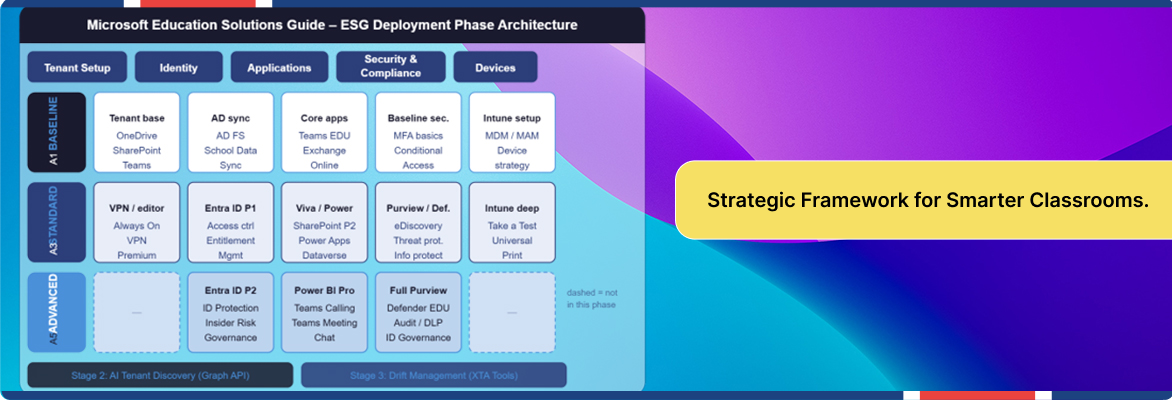
The framework is structured around three stages. The first – and currently live – stage is a library of prescriptive deployment content organized by license tier and technical domain.
The Three Deployment Phases: What Each License Tier Unlocks
The phased structure solves a problem that most education IT teams know viscerally: trying to configure everything at once, for a license tier you do not yet fully occupy, creates sprawl without clarity.
Baseline – Microsoft 365 A1
The Baseline phase is the foundation. For schools running on A1 licenses – which remain broadly available at no cost to qualified educational institutions – the guide walks admins through five functional sections: Tenant Setup, Identity, Applications, Security and Compliance, and Devices. Each section has prescriptive step-by-step content, not high-level suggestions.
Standard – Microsoft 365 A3
The Standard phase assumes Baseline configuration is complete and layers in the capabilities that come with A3 licensing. This is where Microsoft 365 education IT admin best practices get sharper. On the identity side, Entra ID P1 arrives, enabling access controls, password Microsot 365 education security configuration, entitlement management, and application governance at a level A1 simply cannot support.
Advanced – Microsoft 365 A5
Advanced is where Microsoft 365 A5 education security compliance capabilities reach full expression. At this tier, Microsoft Entra ID Plan 2 enables identity protection, insider risk detection, and identity governance workflows. Microsoft Purview and Microsoft Defender for Education unlock full eDiscovery, audit logging, and threat protection.

The Five Sections That Run Through Every Phase
-
- Tenant Setup: Foundational configuration, network, and service activation.
-
- Identity: Architecture for Microsoft Entra ID education identity management, including SIS integration and School Data Sync.
-
- Applications: Configuration of Microsoft Teams education configuration, SharePoint, OneDrive, and Exchange Online for education-specific needs.
-
- Security and Compliance: Microsoft 365 education security configuration progressing from A1 basics through A5-level Purview and Defender controls.
- Devices: Intune-based mobile device management and mobile application management for both managed and unmanaged devices.
What Is Coming: AI-Driven Discovery and Drift Management
The ESG’s roadmap addresses the single biggest operational gap in Microsoft 365 education environments: configuration drift. The 2025 CoreView report found that organizations are 2.3 times more likely to report significant operational overhead when managing ten or more tenants, with 59% citing configuration consistency as the primary pain point.
The planned AI-powered assessment agent will use Graph API calls to compare a live tenant’s actual settings against documented ESG recommendations, producing a gap analysis without requiring manual audit.
How Microsoft Partners Can Leverage the ESG Framework
The ESG is not only for in-house IT teams. It was built explicitly for Microsoft education partners as well – and for good reason. The prescriptive deployment guidelines allow partners to deliver education-specific Microsoft 365 deployments at a standard of quality that generic enterprise playbooks cannot match.
Partners using the ESG benefit from shortened discovery cycles, reduced misconfiguration risk, and a defensible delivery standard they can demonstrate to institutional clients. The framework for education technology digital transformation Microsoft also explicitly identifies unused features and products within a client’s purchased license tier.
People Also Ask:
What is the Microsoft Education Solutions Guide (ESG)?The Microsoft 365 Education Deployment Guide is a prescriptive Microsoft 365 deployment framework for K-12 and higher education institutions, organized into Baseline, Standard, and Advanced phases aligned with A1, A3, and A5 licensing.
How does the Microsoft 365 Education deployment guide differ from a standard M365 guide? The ESG is built specifically for education organizations and includes school-specific scenarios such as School Data Sync, student lifecycle provisioning, and Microsoft Intune for Education device management.
What does each M365 Education A1 A3 A5 license comparison unlock in the ESG?A1 covers the Baseline phase – foundational Microsoft Education tenant setup guide, identity, Teams, SharePoint, and basic security. A3 unlocks the Standard phase with Microsoft Entra ID P1 education management, Intune for Education, and Microsoft Purview education compliance. A5 delivers the Advanced phase with full identity protection, Microsoft Defender for Education, and eDiscovery.
Can Microsoft education partners use the ESG for client deployments? Yes. The ESG includes partner-specific guidance including prescriptive Purple Boxes for education deployment scenarios. Partners can use the framework to standardize delivery, and reduce misconfiguration risk.
What is the planned AI discovery feature in the Microsoft Education Solutions Guide? Microsoft is developing a Graph API-based AI assessment agent that will evaluate a school’s live tenant configuration against ESG recommendations, identifying gaps without manual audit. A drift management tool using Cross Tenant Administration is also planned for ongoing configuration monitoring.
Deploy Microsoft 365 for Education the Right Way with Flexsin
Whether you are standing up a fresh education tenant, rationalizing an environment that has drifted from baseline, or preparing a school district for A3-to-A5 advancement, Flexsin’s Microsoft practice delivers phase-structured deployments backed by verified methodology. Our engagements cover identity architecture, Intune device management, Purview compliance configuration, and Defender security hardening – all aligned to the Microsoft Education Solutions Guide.
Flexsin builds education Microsoft 365 environments that are secure by design, compliant by default, and ready for everything the ESG roadmap has coming next.
Frequently Asked Questions:
1. Is the Microsoft Education Solutions Guide free to access?Yes. The ESG is available at no cost to any qualified education organization through Microsoft Learn at aka.ms/esg. Qualification requires a verified education tenant under a Microsoft 365 Education licensing agreement.
2. Does the ESG apply to higher education, or only K-12? The ESG is designed for all qualified education organizations, including colleges and universities. The phased deployment model and five-section architecture apply to higher education environments.
3. What happens if our school skips directly from A1 to A5 without completing the Standard phase?Skipping phases is technically possible, but it creates compounding configuration risk. A5 features such as Microsoft Entra ID Protection and Purview eDiscovery build on identity and security foundations established in the Baseline and Standard phases.
4. How often is the Microsoft Education Solutions Guide updated? The ESG content is maintained by Microsoft and reflects current product capabilities for each license tier. The Microsoft Learn documentation tracks feature updates, and the planned AI assessment and drift management stages will be added as they reach release.
5. Can the ESG be used to audit an existing Microsoft 365 education environment?Yes, and this is one of its most practical applications. IT admins and partners can use the ESG’s prescriptive guidelines as an audit checklist against an existing tenant’s configuration. The planned AI discovery agent will formalize this capability.
