

 +1.844.3539.746
 info@flexsin.com
Odoo Community vs. Enterprise: Which ERP Edition Fits Your Business?
 Munesh Singh
Let's talk
Table of Contents:
- Breaking Down What Every Odoo Edition Includes
- The Real Cost of Free: Community Edition Limitations You Should Not Ignore
- Enterprise Modules That Expand Odoo Beyond Basic ERP
- What Odoo ERP Really Costs to Run and Maintain
- Odoo Upgrade Planning: Community vs. Enterprise Migration Insights
- The Decision Framework: Choosing the Right Odoo Edition
- People Also Ask
Most companies choose their Odoo edition the wrong way – by defaulting to free. They rationalize it as a cost discipline. Eighteen months later, they are rebuilding the same workflows in Enterprise after burning a development budget that eclipsed the license cost twice over. The choice between Odoo Community vs Enterprise is not a pricing conversation. It is a technical debt conversation, and getting it wrong compounds.
Odoo now serves over 13 million users across 175 countries, with 170,000-plus companies on active deployments and the platform adding roughly 13,000 new clients every month as of late 2025 (Source: GloriumTech Odoo Statistics, https://gloriumtech.com/odoo-statistics/). That scale tells you the platform works. It does not tell you which edition is right for your organization – and that gap is where costly assumptions live.
Breaking Down What Every Odoo Edition Includes
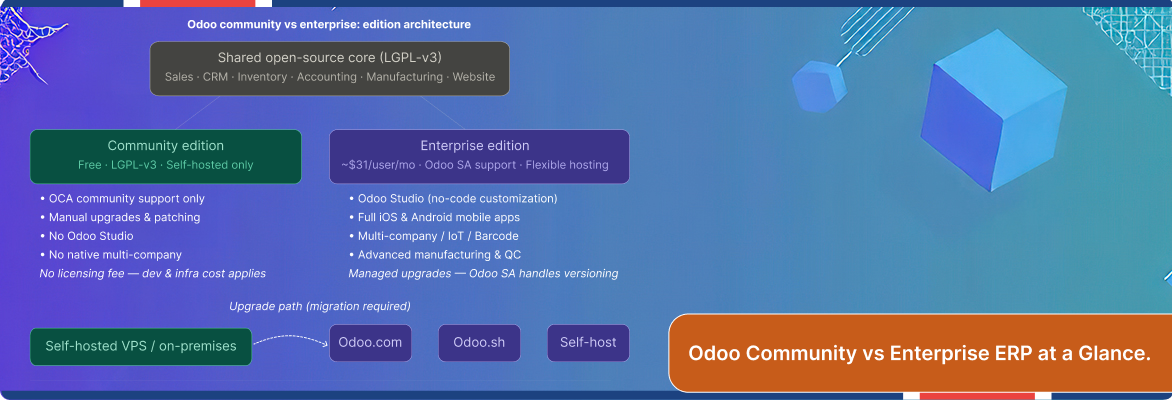
Odoo Community is the open-source core, licensed under LGPL-v3 and free to download, deploy, and modify. You get functional coverage across Sales, CRM, Inventory, Accounting, Manufacturing, and Website – enough to run lean operations. The trade-off is infrastructure ownership: you host it, you maintain it, you patch it. Official Odoo SA support is not part of the package.
Odoo Enterprise is the commercial layer built directly on top of Community. It adds Odoo Studio (a no-code customization environment), full-featured Odoo Enteprise mobile apps for iOS and Android, advanced manufacturing quality control, native multi-company structures, IoT and barcode hardware integration, and managed upgrade cycles handled by Odoo SA. Hosting becomes a choice – Odoo.com, Odoo.sh, or your own infrastructure.
The key distinction: Odoo Enterprise edition features do not replace Community’s architecture. It extends it. Modules you configure in Community remain structurally compatible when you migrate up. That migration path matters, but it is not trivial – it requires module compatibility checks, database migration, and QA cycles before go-live.
Edition Comparison at a Glance
| Dimension | Community Edition | Enterprise Edition |
|---|---|---|
| License Cost | Free (LGPL-v3) | ~$31/user/month (US, annual) |
| Hosting | Self-hosted only | Odoo.com, Odoo.sh, or self-host |
| Core Modules | Sales, CRM, Inventory, Accounting | All Community modules + exclusive add-ons |
| Odoo Studio | Not available | Included |
| Mobile Apps | Limited | Full-featured iOS & Android |
| Official Support | Community/OCA forums | Odoo SA direct support |
| Upgrades | Manual, partner-dependent | Managed by Odoo SA |
| Multi-Company | Not available | Native support |
| IoT / Barcode | Limited | Full hardware integration |
| Best For | Startups, dev teams, tight budgets | Growth-stage to enterprise organizations |
The Real Cost of Free: Community Edition Limitations You Should Not Ignore
Odoo Community edition limitations are not about the modules that are missing. They are about the compounding cost of everything you have to build to compensate. When your finance team cannot generate advanced consolidated reports natively, someone builds a custom module. That module needs maintenance with every Odoo version release. That maintenance requires a developer on retainer or an Odoo implementation partner engagement.
Odoo ERP total cost of ownership analysis across Community deployments consistently shows the same pattern: the license saving disappears within 12 to 18 months for teams above 20 users with active operational needs. Server infrastructure, security patching, custom module upkeep, and version upgrades accumulate. They are real costs, just deferred and dispersed so they do not feel like a line item.
That is the trap. Community is genuinely excellent for the right organization – a technical founding team validating a product, a developer shop running internal tooling, a startup under 10 users proving out processes before scaling. For any organization beyond that inflection point, the calculus shifts.
Enterprise Modules That Expand Odoo Beyond Basic ERP
Odoo Studio Customization
Studio is the most consistently underestimated Enterprise feature in pre-purchase evaluations. It lets business analysts – not developers – add fields, modify views, design custom reports, and automate workflows through a drag-and-drop interface. For a mid-market operations team that needs 15 form customizations over a year, Odoo Studio customization eliminates the equivalent of several developer sprint cycles.
Advanced Manufacturing and Quality
Community’s manufacturing module covers production orders and basic routing. Enterprise extends that into Work Center management with time and cost tracking, Quality Control checkpoints inline with production stages, and Maintenance module integration for predictive maintenance scheduling. For an ERP system for manufacturing SME, that gap is the difference between basic scheduling and production intelligence.
Odoo Enterprise Multi-Company and Reporting
Odoo Enteprsie Multi-company structures in Enterprise are native – intercompany transactions, consolidated financials, and shared inventory pools work out of the box. Community requires third-party OCA modules that introduce version-dependency risk. If your organization has subsidiaries or is planning to acquire, this alone justifies the Enterprise license.
What Odoo ERP Really Costs to Run and Maintain
Enterprise licensing in the US runs approximately $31.10 per user per month billed annually, or roughly $38.90 per user on monthly billing, under the Standard plan (Source: WhizzBridge Odoo Pricing). The Custom plan – which adds self-hosting flexibility and deeper customization access – starts around $46.80 per user per month for Tier-1 markets.
Community is free on licensing but requires server infrastructure. A typical VPS deployment for a 20-user team runs $40 to $120 per month before you account for managed backups, SSL, and security hardening. Odoo hosting options comparison across providers shows that self-hosting on DigitalOcean or Hetzner costs $6 to $48 per month for comparable infrastructure – significantly less than Odoo.sh’s managed tiers at $72 to $144 per month.
Odoo ERP ROI for mid-market businesses does not hinge on license cost alone. The measurable return comes from reduced manual processing, faster month-end close, and lower defect rates post-implementation – outcomes that require the full Enterprise feature set to achieve at scale. Flexsin’s manufacturing implementations have documented a 40% reduction in manual procurement and production tasks post-deployment. A retail client achieved a 30% reduction in stockouts and a 25% improvement in customer satisfaction after Odoo ERP integration with their eCommerce stack.
Odoo Upgrade Planning: Community vs. Enterprise Migration Insights
Starting on Community and planning to migrate later is a legitimate strategy – with one non-negotiable condition: you have to build for migration from day one. That means disciplined module selection (avoiding OCA modules that have no Enterprise equivalents), clean data architecture, and minimal customizations that touch the ORM layer.
The migration itself – when done properly – involves a code compatibility review, database schema migration, module substitution for Enterprise equivalents, and structured QA before go-live. Teams that skip the compatibility review discover mismatches in production. That discovery is expensive.
My professional view, having seen this sequence enough times: if your 12-month roadmap includes advanced reporting, multi-location inventory, or mobile field operations, start on Enterprise. The Community phase will cost you more in rework than it saves in licensing.
The Decision Framework: Choosing the Right Odoo Edition
Choose Community if:
-
- Your team has dedicated Odoo developers in-house
-
- You are under 10 users with stable, simple workflows
-
- You are validating a use case before committing to a full ERP rollout
- Budget constraints are existential at this stage of the business
Choose Enterprise if:
-
- Your team has dedicated Odoo developers in-house
-
- You are under 10 users with stable, simple workflows
-
- You are validating a use case before committing to a full ERP rollout
-
- Budget constraints are existential at this stage of the business
-
- You are validating a use case before committing to a full ERP rollout
-
- Budget constraints are existential at this stage of the business
Odoo Community vs Enterprise ERP is not a debate about ideology – open source ERP for small businesses, versus commercial. It is a question of operational readiness. The businesses that get it right define the problem first, then match the edition to the solution.
Work with Flexsin’s Odoo Development Team
Flexsin’s Odoo development practice has delivered production implementations across healthcare, manufacturing, retail, and professional services – from initial architecture through phased go-live and post-deployment optimization. Whether you are evaluating Odoo Community vs Enterprise for the first time or re-architecting a deployment that has not performed, we provide the technical depth and business context to get it right.
Explore Flexsin’s Odoo Development Services. Start with the right edition. Skip the rework. Build a deployment that scales. builds what survives the real world.
People Also Ask:
1. What is the main difference between Odoo Community and Enterprise?Odoo Community is free and open-source, with essential ERP modules and no official Odoo SA support. Enterprise adds exclusive modules like Odoo Studio, advanced manufacturing, mobile apps, and managed upgrades under a per-user subscription.
2. How much does Odoo Enterprise cost per user? In the US, Odoo Enterprise costs approximately $31.10 per user per month billed annually under the Standard plan. The Custom plan of Odoo Enterprise cose per user for larger deployments starts around $46.80 per month.
3. Can I migrate from Odoo Community to Enterprise later? Yes, migration from Odoo Community to Enterprise ERP is possible but requires module compatibility reviews, database migration, and QA cycles. Building on Community with a migration mindset from the start significantly reduces rework cost.
4. Is Odoo Community really free? What are the hidden costs? The license is free. Hosting, security patching, developer maintenance of custom modules, and manual upgrade management are real costs that accumulate. For teams above 20 users with active operations, the Odoo ERP total cost of ownership often exceeds Enterprise licensing within 18 months.
5. Which Odoo edition is better for manufacturing SMEs? Odoo Enterprise is the stronger choice for manufacturing SMEs. It includes Work Center Management, Quality Control, IoT hardware integration, and advanced production analytics that Community does not offer natively.
6. What is Odoo Studio and is it worth the Enterprise upgrade?Odoo Studio is a no-code customization environment exclusive to Enterprise. It allows business analysts to modify forms, views, reports, and workflows without developer involvement. For teams requiring frequent UI and workflow changes, it eliminates significant ongoing development cost.
Odoo Community vs Enterprise ERP is a decision with a compounding ROI on both sides of the ledger. Choosing wrong does not end your Odoo journey – it just makes the next phase harder and more expensive. Match the edition to the operational reality your business lives in today, not the aspirational one you hope to reach.
