

 +1.844.3539.746
 info@flexsin.com
Copilot Studio Just Got a Major Rebuild. Here’s Why It Matters
 Sudhir K Srivastava
Let's talk
Table of Contents:
- A Building Experience That Finally Respects the Maker’s Time
- Workflows Now Sit Inside the Same Canvas as the Agents
- Computer-Using Agents Move From Preview to Production
- The Adoption Curve Just Got Steeper
- The Missing Link Behind Many Technology Failures
- What the Data Really Reveals
- Frequently Asked Questions
- Where Flexsin Fits Into This Shift
Most enterprise agents fall apart the moment a task gets longer than three steps. Microsoft just rebuilt Microsoft Copilot Studio to fix exactly that problem.
The platform now ships with a new agentic orchestrator built to follow instructions more reliably and to push through recursive, multi-step work without losing the thread. That single change addresses the most common complaint from teams who tried agent building in 2025 and walked away frustrated. The orchestrator does not just respond better.
It thinks in sequence, holds context across steps, and produces richer file outputs for processes that used to break halfway through. This matters because most production failures in agentic AI never come from a bad model. They come from a system that cannot hold a plan together across five or six dependent actions.
A Building Experience That Finally Respects the Maker’s Time
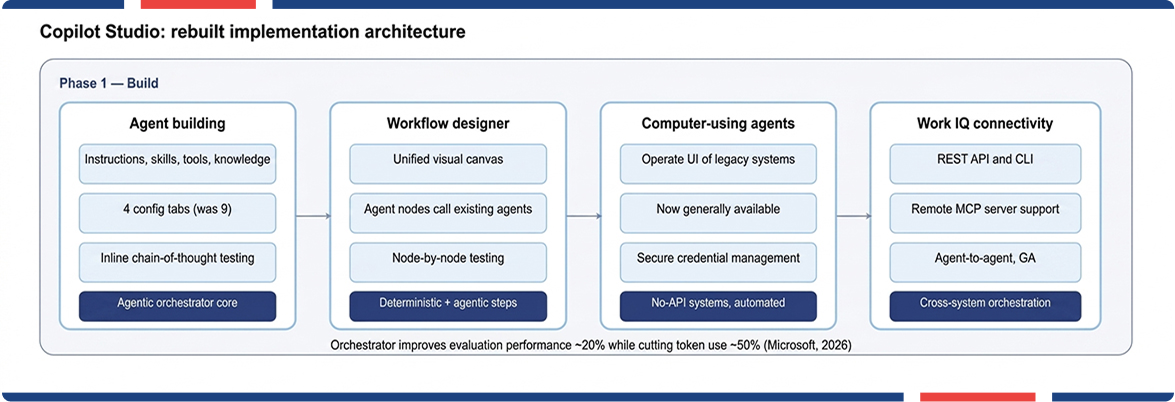
Microsoft cut the AI agent configuration surface from nine tabs to four. The new authoring designer puts instructions, skills, tools, and knowledge in one connected view, which sounds minor until you have spent an afternoon hunting across nine tabs to fix one broken tool call. Makers can now see chain-of-thought reasoning and tool calls inline during testing, which turns debugging from guesswork into something closer to reading a transcript.
Reusable Skills, written in markdown, let teams package logic once and import it across agents instead of rebuilding the same instruction set every time. Knowledge grounding keeps responses tied to enterprise data rather than the model’s general training. None of this is flashy. All of it removes friction in agentic AI orchestrator that used to kill agent projects before they reached production.
Workflows Now Sit Inside the Same Canvas as the Agents
The new workflow designer for AI agents is the part of this rebuild that changes how teams should think about automation architecture. Instead of stitching together separate flows, connectors, and agent logic across different surfaces, Copilot Studio now lets you design the entire process, structured steps and AI-driven reasoning together, on one canvas.
Agent nodes workflow is the mechanism that makes this work. You can call an existing agent directly from inside a workflow, which means deterministic steps handle the predictable parts of a process while the agent takes over the moment a decision requires judgment instead of a fixed rule. That is a meaningfully different model from earlier robotic process automation, where any deviation from the expected input broke the entire flow.
Node-by-node testing and built-in versioning mean a broken step shows itself immediately, not three releases later when someone finally notices the automation has been failing silently.
Computer-Using Agents Move From Preview to Production
Plenty of enterprise systems still have no API. Vendor portals, legacy internal tools, and decades-old line-of-business software were never built to talk to anything else, and that gap is exactly where automation projects used to die. Computer-using AI agents now interact directly with websites and desktop applications through the same interface a human would use, and Microsoft has moved this capability from preview into general availability with enterprise-ready credential management built in.
Graebel, a global relocation services company, built a Service Order Agent on this exact capability. The company’s proprietary platform lacked API support, so earlier agentic automation enteprise attempts could not keep pace with the variability in incoming requests.
The new agent interprets unstructured emails, validates them against business rules, operates the legacy platform through the UI, and escalates exceptions through a workflow when something does not fit the pattern. It now scales across more than thirty relocation service categories.
That is the real argument for this Microsoft Copilot rebuild. It is not about agents that look impressive in a demo. It is about agents that survive contact with a messy, decades-old system and keep working anyway.
The Adoption Curve Just Got Steeper
Enterprise appetite for this kind of platform has shifted fast. Gartner’s most recent CIO survey found that only 17 percent of organizations have deployed AI agents so far, yet more than 60 percent expect to do so within two years, making agentic AI solutions the most aggressive enteprise AI agent adoption curve among every emerging technology the survey tracked (gartner.com). Separately, Gartner projects that 40 percent of enterprise applications will carry task-specific AI agents by the end of this year, up from under 5 percent in 2025.
The gap between those two numbers is the opportunity. Most organizations are still standing at the starting line while the platforms they will need are already shipping. A rebuilt Microsoft Copilot Studio, with a more reliable orchestrator and a workflow canvas built for multi-agent coordination, is squarely aimed at the second half of that curve: the 60 percent who intend to move but have not yet picked the foundation they will build on.
The Missing Link Behind Many Technology Failures
An AI agent that works brilliantly in isolation is still a liability if it cannot share context with the five other systems running the business. Work IQ Microsoft now ships with a REST API and command-line interface, along with support for remote MCP servers, giving agents a standardized way to reach tools and enterprise resources instead of requiring a custom integration for every connection.
Agent-to-agent communication is now generally available inside Microsoft Copilot Studio, which means specialized agents across departments can exchange information and delegate tasks without a human relaying messages between them. This is the unglamorous infrastructure work that determines whether an agent program scales past a single pilot or stalls there permanently.
In Flexsin’s Copilot consulting services experience advising enterprise teams through platform transitions, the projects that fail are rarely the ones with weak AI. They are the ones where nobody planned for the agent to talk to anything outside its own sandbox. Microsoft closing that gap at the platform level for AI agent governance removes an excuse that has stalled more rollouts than any model limitation ever did.
What the Data Really Reveals
Microsoft reports that the new orchestration layer improved evaluation performance by roughly 20 percent while cutting net token consumption by half, according to internal usage data shared alongside the May update. Lower token consumption is not a footnote. It is the difference between an agent program that scales economically and one finance quietly kills in the next budget cycle.
Frequently Asked Questions:
1. What is the new Microsoft Copilot Studio orchestrator? It is a rebuilt AI core that follows instructions more reliably and handles recursive, multi-step AI workflow and tasks. Microsoft reports a roughly 20 percent gain in evaluation performance alongside lower token use.
2. How do I build a workflow with agent nodes in Copilot Studio? Open the new AI agent workflow designer and add structured steps for predictable logic, then insert an agent node wherever a decision requires reasoning over context rather than a fixed rule.
3. Is Copilot Studio the same as Microsoft Copilot Studio agent building? Yes. Microsoft Copilot Studio is the low-code agent building platform for building, testing, and publishing AI agents and the workflows that orchestrate them across Microsoft 365 and connected business systems.
4. How much does Copilot Studio cost compared to building custom agents?Pricing depends on usage and licensing tier, but the low-code workflow designer and reusable Skills generally cut development time compared to custom-built agent infrastructure, which lowers total implementation cost.
5. How long does it take to deploy a computer-using agent in Copilot Studio?Timelines vary by process complexity, but computer-using agents are now generally available, so enterprise pilots that previously waited on preview access can move directly into production testing.
6. What is agent-to-agent communication in Copilot Studio?It lets separate agents exchange information and delegate tasks directly, without a human relaying messages between systems. This capability is now generally available across the platform.
Where Flexsin Fits Into This Shift
Rebuilding an automation strategy around agent nodes, computer-using agents, and cross-system AI agent orchestration platform is not a weekend project. It requires a partner who has already mapped where deterministic workflows end and agentic reasoning should begin. Flexsin’s Microsoft Power Platform practice helps enterprises architect that boundary correctly the first time, instead of learning it through a failed pilot. Explore Flexsin’s Microsoft Power Platform services and start the conversation with a team that builds these systems for a living.
