

 +1.844.3539.746
 info@flexsin.com
Copilot AI Agents – Moving Beyond Conversations to Enterprise Action
 Sudhir K Srivastava
Let's talk
Table of Contents:
- Copilot Studio Enterprise Deployment
- Copilot AI Agent Governance
- The ROI Reality for Microsoft Copilot AI Agents in Enterprise
- How Copilot Agents Streamline Everyday Business Operations
- Critical Readiness Factors for Enterprise-Wide Copilot Studio Agent Deployment
- People Also Ask
- Move Beyond the Pilot
- Frequently Asked Questions
The promise of agentic AI is not smarter chat. It is machines that sense a trigger, plan a response, execute across connected systems, and close the loop – without waiting for someone to type a prompt. According to Microsoft Build 2025 data, daily active usage of AI agents has more than doubled in the past year. That growth reflects a structural shift: enterprises are moving from exploring Copilot to expecting it to own end-to-end workflows.
Traditional chatbots respond to prompts in a single turn. Copilot AI agents in Microsoft 365 are architecturally different: they hold memory across steps, access live business systems through connectors, execute tasks in other applications, and can invoke other specialized agents to handle subtasks. The underlying shift is from reactive to autonomous AI agents.
Microsoft 365 Copilot agents embed directly into Teams, Word, Outlook, Excel, and SharePoint. When connected to your organization’s data through Microsoft Graph and Dynamics 365, they do not just retrieve information – they take structured action on it. An agent does not draft a response to a support ticket and stop.
Copilot Studio Enterprise Deployment
The highest-value deployments are not the most complex. They are the ones with the clearest trigger and the most repeatable process.
IT service management is the most mature use case. HCLTech deployed a Copilot Studio agent across its 500-person support function that resolved cases 40% faster and allowed the company to redeploy 30% of that staff to higher-order work. The agent classified inbound requests, matched them against the knowledge base, escalated ambiguous Copilot agent use cases, and closed routine tickets without human intervention.
Sales and customer service are close behind. Accenture’s deployment across 200,000 users found that 97% of employees completed routine tasks 15 times faster, with 53% reporting significant productivity improvement – currently the largest enterprise Copilot deployment on record. Agents operating in Copilot agents Outlook handle customer email responses by pulling CRM context, pricing history, and call summaries before generating the draft.

Copilot AI Agent Governance
Speed of deployment and scale of deployment are different problems. Most enterprise failures happen when organizations treat them as the same.
Governance is not a compliance checkbox you complete at the end. It is the operational precondition for trust. Microsoft’s April 2026 Copilot Studio updates focused on exactly this – expanding visibility and control for admins managing agents across connected workflows.
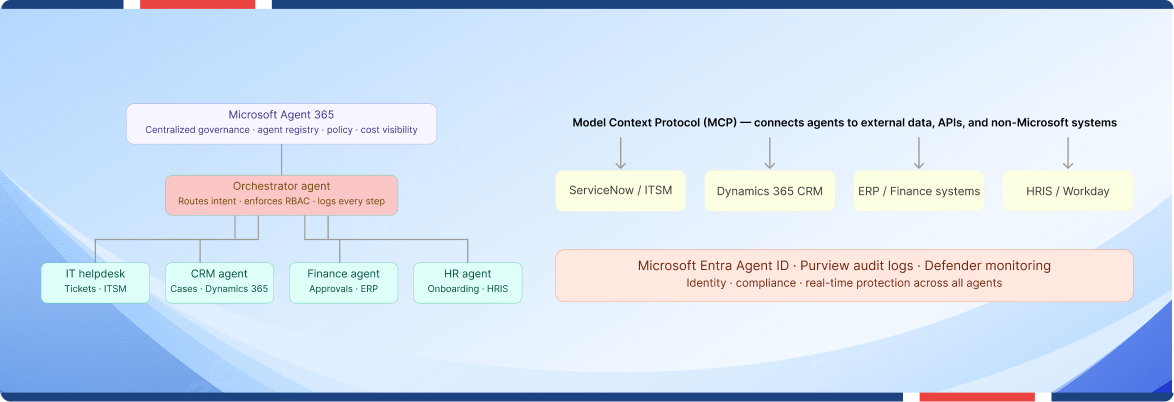
Microsoft Entra Agent ID gives IT teams identity-level visibility into agent actions. Microsoft Purview audit logs capture all agent-related administrative activity. Together, they allow security teams to monitor agent behavior with the same rigor they apply to human users. Security concerns remain real – recent data shows approximately 35% of companies have delayed full Copilot rollout due to compliance issues.
The other governance failure pattern is scope creep. An agent that starts as a ticketing helper gets incrementally connected to more systems until its effective permissions exceed those of the employees it supports. The correct architecture keeps each agent scoped to the systems it genuinely needs.
The ROI Reality for Microsoft Copilot AI Agents in Enterprise
Forrester’s Total Economic Impact study commissioned by Microsoft found organizations can project ROI between 112% and 457% on Microsoft 365 Copilot deployments, depending on scope and use case alignment. For a 25,000-employee enterprise, the modeled ROI runs 116% over three years with nearly $20M in net present value.
As of April 2026, Microsoft 365 Copilot has surpassed 20 million paid enterprise seats, with over 60% of Fortune 500 companies operating at least 10,000 seats. Over 230,000 organizations use Copilot Studio enterprise deployment to build custom agents. Those numbers reflect something more significant than adoption momentum – they reflect an architectural bet by the enterprise market that agentic AI will define the next phase of digital operations.
How Copilot Agents Streamline Everyday Business Operations
The most underestimated surface for Microsoft Copilot AI agents is not the one most organizations prioritize first.
Teams and Outlook are where work already happens. Copilot agents embedded in these surfaces do not require employees to change tools or learn new workflows – the agent meets them where they already operate. In Teams, agents manage meeting agendas, generate structured summaries, create tasks with owners and deadlines.
In Outlook, AI agents for enterprise workflows that understand inbox and calendar context can classify inbound email by urgency, surface relevant prior correspondence, draft responses incorporating CRM data, and flag scheduling conflicts before they materialize. These agents do not replace judgment – they prepare the ground for it.
Critical Readiness Factors for Enterprise-Wide Copilot Studio Agent Deployment
Two infrastructure problems break more Copilot agent deployments than poor prompting ever will.
The first is hybrid system connectivity. Most enterprises run a combination of modern cloud applications and legacy on-premises systems. Copilot agents operate natively within the Microsoft cloud, but a significant share of the data they need to act on lives elsewhere. Connectors and APIs solve this, but they must be budgeted, architected, and maintained.
The second is change management. The three most cited barriers to enterprise Copilot adoption are data governance concerns, insufficient change management budget, and the absence of internal AI Champions who can demonstrate agent workflows to non-technical employees across business units. Copilot Studio’s low-code interface makes agent creation accessible.
People Also Ask:
What are Copilot AI agents? Microsoft Copilot AI agents are autonomous AI systems embedded in Microsoft 365 that execute multi-step tasks across connected business systems. Unlike chatbots, they act on triggers, plan workflows, and complete tasks without manual prompting.
How do Copilot AI agents differ from traditional automation? Traditional automation executes fixed rules on structured data. Copilot AI agents apply language understanding to interpret context, make decisions across variable inputs, and adapt workflows when conditions change.
What is Microsoft Agent 365? Microsoft Agent 365 platform is a centralized governance control plane introduced at Ignite 2025. It provides agent registry, access controls, usage visualization, and cost tracking across all enterprise Copilot agents regardless of build origin.
What is the ROI of Microsoft 365 Copilot agents? Forrester modeled 112% to 457% ROI for enterprise AI agents deployments, with a 25,000-employee organization realizing 116% ROI over three years. Task completion time drops 29% on average across workflows.
What is multi-agent orchestration in Copilot? Multi-agent orchestration CoPilot uses a parent agent to route intent to specialized sub-agents, each owning a specific system connection. Governance and access controls sit at the orchestration layer, ensuring security travels with the workflow.
How long does enterprise Copilot agent deployment take? A well-scoped AI agent business process automation can reach production in 4 to 8 weeks. Microsoft recommends a 90-day activation tracking period before measuring full productivity impact across user cohorts.
What governance tools does Microsoft provide for Microsoft Copilot AI agents?Microsoft provides Entra Agent ID for identity-level agent visibility, Purview audit logs for activity capture, and Agent 365 for policy management. Copilot Studio includes lifecycle management and agent evaluation built into the Microsoft AI agent platform.
Move Beyond the Pilot
Flexsin is a Microsoft Solutions Partner with deep experience deploying Copilot Studio agents across enterprise environments in healthcare, financial services, and operations. From CoPilot AI agent governance architecture to multi-agent orchestration, we build the infrastructure that turns agentic AI Microsoft enterprise into measurable business outcomes – not another POC that stalls at scale.
Connect with Flexsin’s Micrsoft team to define your agent deployment roadmap and start generating measurable ROI within 90 days.

Frequently Asked Questions:
1. What is the difference between Microsoft 365 Copilot agent and a Copilot AI agent? Microsoft 365 Copilot is the base AI layer embedded in productivity apps – it assists with tasks when prompted. A Copilot AI agent is a purpose-built autonomous system that monitors triggers, executes multi-step workflows.
2. Can Copilot agents connect to non-Microsoft systems? Yes. Through Model Context Protocol (MCP) support, Copilot Studio agents can connect to external applications, third-party APIs, and non-Microsoft data sources. Connectors, custom APIs, and MCP servers allow agents to operate across hybrid environments.
3. How many agents can an enterprise run simultaneously?There is no fixed architectural limit. Microsoft Agent 365 is designed specifically to manage agent fleets at enterprise scale, providing visibility and governance across all agents regardless of build method or deployment surface.
4. What Microsoft license is required to build and deploy Copilot agents? Building custom agents in Copilot Studio requires a Microsoft 365 Copilot license. Copilot capabilities for Dynamics 365 Sales, Service, and Business Central are now included at no additional cost as of October 2025.
5. How do enterprises manage the security risk of autonomous agents? Microsoft provides a layered security framework: Microsoft Entra Agent ID assigns identities to agents for auditability, Purview captures all agent activity in compliance logs, and Copilot Studio admin controls enforce role-based access and usage policies.
