

 +1.844.3539.746
 info@flexsin.com
Manufacturing ERP Bottlenecks That Lead to Operational Blind Spots
 Sudhir K Srivastava
Let's talk
Table of Contents:
- When Standard ERP Configurations Can’t Keep Up with Manufacturing Complexity
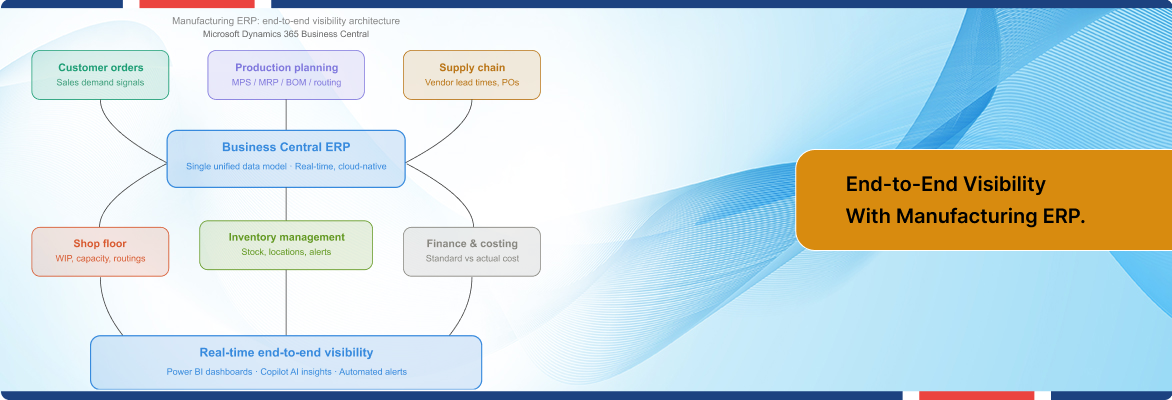
- How Manufacturing ERP Actually Builds End-to-End Visibility
- Business Central for Manufacturing ERP: Capabilities in Depth
- Flexsin’s Analysis of Manufacturing ERP Integration
- Practical Considerations for Manufacturing ERP Implementation
- Key Questions Decision-Makers Ask
- Most Asked Questions
Three systems updated last night. None of them talked to each other. That is how a $4 million production run gets scheduled against inventory that shipped two days ago.
Most manufacturers do not suffer from a data shortage. They suffer from data that arrives fractured, delayed, and out of sequence. The shop floor runs one system. Procurement runs another. Finance closes the books on a version of reality that stopped being accurate sometime last Tuesday. Each team believes it has the full picture. None of them do.
That gap between knowing and acting is where manufacturers bleed margin. A late purchase order is not just a procurement problem – it is a cascading failure that touches capacity scheduling, customer delivery commitments, and cost-of-goods calculations simultaneously. Fixing it after the fact costs three to five times more than preventing it in real time.
This is the core argument: end-to-end supply chain visibility is not a reporting feature. It is a data architecture decision. And that decision starts with the manufacturing ERP at the center of the operation.
When Standard ERP Configurations Can’t Keep Up with Manufacturing Complexity
Here is something the software demos rarely show you: a general-purpose ERP installed without manufacturing-specific configuration is essentially a sophisticated accounting system with a production veneer on top.
Most standard manufacturing ERP deployments were designed around financial workflows. They track transactions beautifully. What they struggle with is the physical reality of manufacturing ERP – the live interplay between work centers, material queues, routing sequences, and capacity constraints that shifts by the hour on an active shop floor.
The Three Structural Gaps
Supply chain data silos in manufacturing form when ERP, MES, PLM, and QMS data stays trapped in disconnected systems – often after acquisitions, legacy platform decisions, or simply a lack of data governance strategy. When those silos persist, you cannot run meaningful predictive analytics. You cannot do real AI-assisted planning. The models have no access to both historical events and real-time sensor data simultaneously.
The second gap is planning latency. Standard manufacturing ERP configurations pull demand signals from sales orders and generate purchase or production suggestions on a scheduled batch cycle. In a volatile supply environment – and supply chains have stayed volatile through the recent years of disruption – batch planning means every actionable recommendation is already partially stale by the time a planner reviews it.
The third gap is the separation of financial and operational data. In a disconnected architecture, your finance team sees inventory value as a ledger balance. Your production team sees it as physical units. When those two views diverge – and they always diverge at month-end – the reconciliation exercise costs days of analyst time and produces a historical truth that is already irrelevant to the decisions being made today.
Gartner predicts that 70% of ERP initiatives will fail to meet business goals by 2027 – largely because organizations treat ERP as a system replacement rather than an operational transformation.
How Manufacturing ERP Actually Builds End-to-End Visibility
The architecture of real-time production visibility is not a dashboard you buy. It is a data layer you build – and manufacturing ERP consulting is the foundation layer that makes every other signal coherent.
Think of it this way. IoT sensors on your production line generate thousands of data points per hour. Those data points are noise until they are contextualized against a production order, a BOM, a routing sequence, and a customer delivery commitment. Manufacturing operations visibility through ERP integration that context. Without it, you have telemetry. With it, you have intelligence.
The Connected Data Model
A properly configured manufacturing ERP software connects five data layers that most organizations currently run in isolation. ERP for production planning and capacity scheduling form the first layer – the system maintains a live picture of what each work center is committed to, what is queued, and where slack exists. Material availability forms the second layer – purchase orders, goods receipts, inventory locations, and reorder points all feeding a single authoritative record.
Financial costing forms the third layer – standard cost versus actual cost tracked at the production order level, not reconciled at month-end. Quality and compliance form the fourth layer – inspection records tied to specific production runs and lot numbers.
Customer order management closes the loop as the fifth layer – demand signals that automatically cascade into production and purchase recommendations. When those five layers share a single data model, the system can surface a supply shortage alert before it becomes a production stoppage. That is the operational definition of end-to-end supply chain visibility.

Business Central for Manufacturing ERP: Capabilities in Depth
Microsoft Dynamics 365 Business Central consulting for manufacturing is where this architecture becomes tangible for mid-market manufacturers. It is not the only manufacturing ERP on the market. But its integration model – natively connecting production planning, ERP inventory management manufacturing, supply chain, and financials on a single cloud-based platform – addresses the structural gaps described above without requiring a separate MES integration as the foundation.
Production Planning: MPS and MRP in a Single Engine
Business Central’s planning engine runs two interconnected algorithms. The Master Production Schedule (MPS) handles top-level demand from sales forecasts and confirmed orders. It generates supply order proposals for finished goods based on actual customer signals – not system defaults. Material Requirements Planning (MRP) then cascades from the MPS output, evaluating dependent demand across every level of the bill of materials.
The Planning Worksheet acts as the planner’s control center. You can review and override recommendations before they become live orders, trace the root cause of any anomaly using order tracking tools, and set time fences to protect near-term production from automated over-rides. This is not theoretical – it is a configurable safeguard against one of the most common manufacturing ERP failure modes: systems that auto-generate orders nobody reviewed.
Bill of Materials and Routing Integration
BOMs in Business Central are not static documents – they are live manufacturing instructions that drive material staging, capacity scheduling, and cost calculation simultaneously. Every production order pulls the current BOM version. Every routing sequence maps to specific work centers with defined capacity. When you change a BOM, the downstream planning impact is immediately visible before you confirm the revision. That capability alone eliminates an entire class of production errors that cost manufacturers heavily when discovered after goods are already in WIP.
Real-Time Inventory Across the Supply Chain
Business Central supply chain integration provides live inventory status updates across warehouse locations, production floors, and in-transit shipments. The system surfaces alerts on low stock levels and potential delivery delays before they impact the production schedule – not after. Combined with automated replenishment rules and vendor-specific lead time parameters, manufacturing ERP for production planning becomes genuinely predictive rather than reactive.
Power BI and Copilot: The Analytics Layer
Business Central’s native Power BI integration transforms operational data into decision-ready intelligence. Production throughput, on-time delivery rates, inventory turns, and supplier performance all become visible through live dashboards rather than static weekly reports. The embedded Microsoft Copilot capability extends this further – AI-powered inventory forecasting and predictive cash management are available natively for cloud deployments. This is where cloud ERP for manufacturers starts to compound: the system learns from your operational data and surfaces recommendations you would not have generated manually.
The Premium license tier ($110 per user per month) unlocks the full manufacturing and service management module suite of manufacturing ERP integration. For manufacturers running production planning, BOM management, production scheduling software ERP, and quality control, this is the correct licensing tier – the Essentials tier at $80 per user does not include the manufacturing modules.
Flexsin’s Analysis of Manufacturing ERP Integration
After working across pharmaceutical manufacturers, precision engineering firms, sanitary goods producers, and global rug manufacturers, the pattern is consistent: the technical implementation of Dynamics 365 Business Central for manufacturing is rarely where projects struggle. The struggle is almost always in master data quality and process alignment before go-live.
Here is the non-obvious insight that most implementation narratives omit: Business Central’s planning engine is only as intelligent as the data it operates on. Item planning parameters – safety stock levels, reorder points, lead time configurations, BOM accuracy – need to be defined and verified by people who understand the production operation, not just the software. A manufacturing ERP implementation that skips this discipline produces an automated system that generates unreliable recommendations at scale.
The implementation engagements at of manufacturing ERP consulting Flexsin that deliver measurable ROI treat the go-live as the midpoint, not the endpoint. Post-implementation optimization – reviewing planning parameter accuracy, refining routing sequences against actual cycle times, validating cost structures – is where the real operational improvement compounds. The system needs six to twelve months of production data before its recommendations become genuinely trustworthy at a granular level.
That is a hard truth that takes experience to communicate to a client who just spent significant budget getting live. But manufacturers who accept it build operations that get measurably better every quarter. The ones who treat go-live as the finish line hit a plateau within eighteen months and start questioning the platform instead of the configuration.
Practical Considerations for Manufacturing ERP Implementation
Business Central for manufacturing is an excellent fit for mid-market manufacturers with production complexity that ranges from light assembly through multi-level BOM discrete manufacturing. It is not the right tool for every scenario, and the honest answer matters more than the sales case.
Where Business Central Has Real Constraints
Process manufacturing – chemicals, food and beverage, pharmaceuticals requiring batch genealogy with FDA Part 11 compliance – needs capabilities that go beyond Business Central’s native manufacturing modules. You are looking at either significant ISV extension work or a platform better suited to process industry requirements.
High-frequency MES integration – facilities running real-time machine data collection at sub-second intervals for quality monitoring – will find Business Central’s native manufacturing module insufficient as the ERP shop floor integration and execution system. A dedicated MES platform with a Business Central integration layer is the right architecture here.
Very large enterprise manufacturing ERP with 500+ concurrent production order lines and complex multi-site capacity optimization may find Business Central’s planning engine less performant than dedicated advanced planning and scheduling (APS) systems. This is not a deficiency – it is a scope boundary that Dynamics 365 Finance and Operations (F&O) addresses for that scale.
Integration Complexity
Manufacturing ERP implementation complexity scales directly with the number of external systems that need to connect to Business Central. Legacy warehouse management systems, third-party quality platforms, and specialist CAD/PLM tools each require API integration work. The Power Platform and Business Central’s native AL extension framework handle most scenarios, but integration timelines should be planned conservatively, not optimistically.
Key Questions Decision-Makers Ask:
What does end-to-end visibility mean in manufacturing ERP?
End-to-end supply chain visibility means every department – from procurement to production to finance – operates from the same real-time data set. A manufacturing ERP like Business Central connects those departments in a single system so there is no reconciliation lag between operational reality and management reporting.
How does Business Central for manufacturing differ from standard ERP?
Business Central for manufacturing includes native MRP, MPS, BOM management, routing, and capacity planning modules unavailable in standard financial ERP configurations. The Premium license tier unlocks full production and service management capabilities for manufacturers who need end-to-end production control.
How does Business Central for manufacturing differ from standard ERP?
Business Central for manufacturing includes native MRP, MPS, BOM management, routing, and capacity planning modules unavailable in standard financial ERP configurations. The Premium license tier unlocks full production and service management capabilities for manufacturers who need end-to-end production control.
How long does a manufacturing ERP implementation take?
A Business Central manufacturing implementation for a mid-market manufacturer typically runs four to nine months, depending on data complexity and integration scope. Post-go-live optimization, where the system reaches its full planning accuracy, adds another six to twelve months.
Can Business Central integrate with shop floor IoT systems?
Yes – Business Central integrates with IoT devices and MES platforms via APIs and the Power Platform. Native shop floor execution remains limited; high-frequency machine data collection typically requires a dedicated MES layer connected to Business Central as the ERP of record.
What is the cost of Dynamics 365 Business Central for manufacturing?
The Premium license, which includes manufacturing and service management modules, is priced at $110 per user per month. The Essentials license at $80 per user per month does not include manufacturing functionality. Implementation and configuration costs are separate and vary by project scope.
Why do manufacturers struggle with data silos even after ERP deployment?
Data silos in manufacturing persist after ERP deployment when systems like MES, PLM, and QMS remain disconnected from the ERP platform. Eliminating supply chain data silos in manufacturing ERP implementation requires both technical integration and a disciplined master data governance strategy.
Ready to Build Real Visibility Into Your Manufacturing ERP?
Disconnected systems are not a technology problem – they are a business risk. Every production decision made on stale, fragmented data costs margin that a properly implemented manufacturing ERP would protect.
Flexsin’s Microsoft-certified team has delivered Dynamics 365 Business Central implementations for manufacturers across pharmaceutical, precision engineering, consumer goods, and industrial verticals. Our engagements are scoped for go-live certainty and post-implementation optimization – not just system deployment.
Explore Flexsin’s Dynamics 365 Business Central consulting services.
Most Asked Questions
1. Is Dynamics 365 Business Central suitable for small manufacturers? Yes. Business Central is designed for small and mid-sized businesses and scales efficiently as production complexity grows. The Essentials and Premium license tiers give manufacturers a cost-effective entry point into cloud ERP for manufacturers without the overhead of enterprise-scale platforms.
2. What is the difference between MRP and MPS in Business Central?MPS (Master Production Schedule) plans finished goods supply based on top-level demand from forecasts and confirmed orders. MRP then calculates dependent material demand across all BOM levels, generating purchase and production order recommendations at every level of the production hierarchy.
3. Can Business Central handle multi-site manufacturing operations?Business Central supports multi-location inventory and can manage production across multiple sites within a single company database. For complex multi-entity or multi-country operations, a two-tier ERP strategy – with Dynamics 365 Finance and Operations at the enterprise level and Business Central at the subsidiary level – is a recognized architecture pattern.
4. How does Business Central support quality management in manufacturing? Business Central includes native quality inspection orders that can be linked to production orders and item receipts. For manufacturers requiring advanced quality management with full traceability, lot-based recall capabilities, and regulatory documentation, ISV extensions from the Microsoft AppSource marketplace provide deeper quality functionality integrated with the core manufacturing ERP.
5. What data does Business Central use to generate production planning recommendations?Business Central’s planning engine draws from sales forecasts, confirmed sales orders, current inventory levels, open purchase orders, production order status, item-level safety stock parameters, vendor lead times, and work center capacity. The quality of planning output is directly dependent on the accuracy of these input parameters – particularly item master data and BOM configurations.
6. How does manufacturing ERP software reduce production downtime? Manufacturing ERP software reduces unplanned downtime by surfacing material shortages, capacity conflicts, and supply chain delays before they interrupt production. Predictive inventory alerts and automated replenishment rules in Business Central keep material availability aligned with the production schedule, shifting teams from reactive problem-solving to proactive resource management.
7. What integrations does Business Central support for manufacturing? Business Central integrates natively with Microsoft 365, Power BI, Power Automate, and Azure IoT. Third-party integrations with warehouse management systems, e-commerce platforms, EDI networks, and specialist manufacturing applications are available through the Power Platform API layer and AL extensions.
