

 +1.844.3539.746
 info@flexsin.com
When Your CRM and ERP Speak Different Languages: Fixing Business Central Non-Native CRM Integration
 Sudhir K Srivastava
Let's talk
Table of Contents:
- What You Should Know First
- The Complexity You Are Already Facing
- Where Business Central Non-Native CRM Integration Programs Commonly Fail
- Flexsin’s Business Central CRM Integration Execution Framework >
- Flexsin’s Business Central Non-Native CRM Integration Strategy
- What to Validate Before You Start: Critical Prerequisites
- Balancing Flexibility and Control
- People Also Ask
- What Leaders Ask Us
Microsoft Business Central has exactly one out-of-the-box CRM integration – with Dynamics 365 Sales. Every other connection requires middleware, API configuration, or a third-party connector. That’s not a technical footnote; it’s the single most important commercial decision your team will make before a vendor demo ever happens.
Most mid-market teams learn this the hard way. A manufacturer in the Pacific Northwest connected Salesforce to Business Central through a generic connector, shipped it in eight weeks, and spent the next ten months patching broken order flows because trigger logic had never been defined. The integration worked. The business logic didn’t. What’s not equally diverse is the quality of execution guidance – and that gap is where projects die.
The global CRM market reached $112.91 billion in 2025, according to SellersCommerce, and is forecast to surpass $262 billion by 2032. At that scale, the vendor options for Business Central non-native CRM integration are genuinely wide. But options don’t equal outcomes. This piece maps where the execution breaks and gives you a methodology that holds past go-live.
What You Should Know First
Five things that determine whether your Business Central non-native CRM integration succeeds or becomes a remediation project:
-
- Business Central’s only native CRM integration is Dynamics 365 Sales – every other platform requires deliberate middleware design.
-
- Data ownership conflicts, not API mismatches, drive the majority of CRM ERP integration failures post-launch.
-
- A 2025 Pacific Journal of Business Innovation study found that companies with properly designed ERP-CRM architecture saw 25% higher service quality – but only when data governance was defined upfront.
-
- MuleSoft’s 2025 Connectivity Benchmark Report found that 95% of organizations struggle to integrate data across systems – the Business Central API is well-documented, but the business logic surrounding it is almost never standardized.
-
- Scope creep after go-live – not the initial build – is what makes most integrations expensive to maintain over time.
- Business Central CRM integration budget must include the middleware subscription, custom development, testing, and 12 months of post-go-live maintenance, not just the CRM license fee.
The Complexity You Are Already Facing
Here’s the reality most Business Central Non-NativeCRM integration guides skip: no CRM connects to Business Central automatically except Dynamics 365 Sales. Salesforce, HubSpot, Zoho, and Pipedrive all work – but each requires a separate architecture decision about how data flows, which system owns each record type, and what business events trigger cross-system actions. That’s not a setup task. That’s a design project, and it should happen before any vendor is selected.
The integration options fall into three patterns. Native connectors work only for Dynamics 365 Sales. Middleware platforms – Azure Logic Apps, Power Automate, third-party iPaaS tools like Celigo or Rapidi – act as an orchestration layer between Business Central and the CRM. Direct API calls, built against Business Central’s RESTful OData v4 API, offer the most flexibility but demand the most maintenance discipline. Each pattern carries a different cost structure, failure mode, and long-term maintenance burden. Choosing Salesforce and then discovering your integration budget can’t support a production-grade iPaaS connection is a lesson most teams can’t afford twice.
Why the Architecture Conversation Must Happen First
The sequencing trap is consistent: someone in leadership asks which CRM is compatible with Business Central and expects a product name back. The team selects the platform. Then IT is asked to make it work. That sequence builds integrations that function at launch and degrade over 18 months as new fields, modules, and workflows get added without a governance model to contain them. Business Central Non-Native CRM integration challenges that appear technical are almost always architectural.

Where Business Central Non-Native CRM Integration Programs Commonly Fail
Technical compatibility is almost never the bottleneck. Business Central’s OData v4 API is well-documented and broadly supported. The four failure patterns that actually break integrations have nothing to do with API documentation.
Role-Based Access Control and Least Privilege
Odoo ERP data security enforces role-based access control (RBAC) at the module, record, and field level. Administrators can restrict access by group, role, or individual field to prevent unauthorized data exposure. This granularity is a direct implementation of the least-privilege principle required under ISO 27001’s access control domain, and it is auditable. Every access policy change creates a log entry.
Data Ownership Conflicts
Business Central and the CRM both want to be the system of record for customer data. Without a record ownership matrix – a document that specifies which system controls each data entity, and what happens when both systems hold conflicting versions of the same record – field-level conflicts accumulate silently. You won’t see the corruption until finance notices that customer credit limits in Business Central Non-Native CRM integration don’t match what sales sees in the CRM.
Lifecycle Stage Mismatches
HubSpot defines contacts in marketing terms: leads, MQLs, SQLs. Business Central operates in transaction terms: customers, vendors, contacts. Those two models don’t overlap by default. When a closed-won deal in HubSpot doesn’t automatically create a sales order in Business Central – because the lifecycle stage mapping was never configured – it’s not a bug. It’s a design gap that was never addressed.
Trigger Logic Gaps
When should a credit hold in Business Central block a deal from progressing in the CRM? When should a new customer record in the Dynamics 365 Business Central CRM create a contact in Business Central rather than triggering a duplicate? These aren’t default behaviors in any Business Central non-native CRM integration. They’re configurations that have to be specified, tested, and documented before go-live. Most aren’t.
Post-Go-Live Scope Drift
What nobody says out loud: integration projects don’t end at go-live. New fields, new modules, new workflows get added. If the integration wasn’t built with extensibility in mind – with the middleware layer designed to handle configuration changes without custom code rewrites – each addition becomes its own mini-project. That’s where the real long-term cost lives, and most integration proposals don’t surface it.
Flexsin’s Business Central CRM Integration Execution Framework
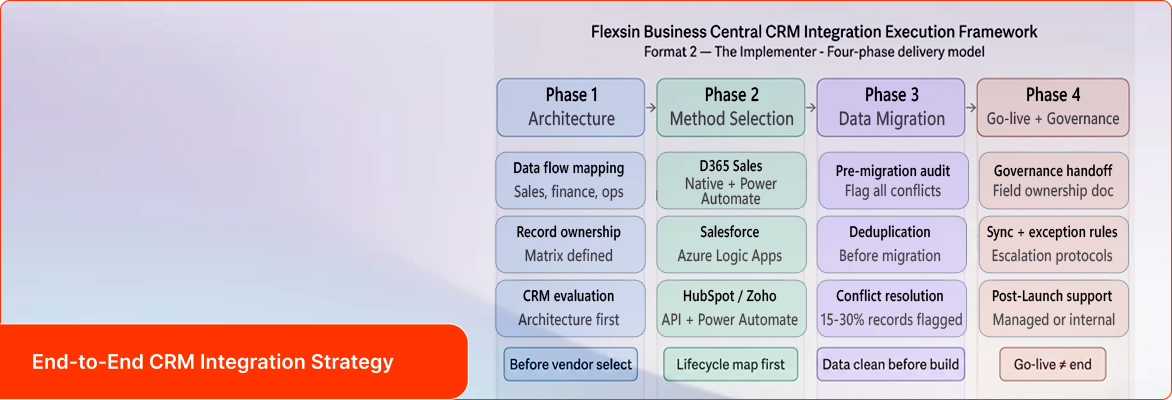
Flexsin’s approach to Business Central non-native CRM integration follows a four-phase model designed for mid-market businesses that can’t afford a six-month implementation runway and can’t afford to rebuild in 18 months.
Post-Go-Live Scope Drift
| CRM | Native BC Connector | Integration Method | Best Fit | Key Limitation |
|---|---|---|---|---|
| Dynamics 365 Sales | Yes (built-in) | Native / Power Platform | Microsoft-stack enterprises | Requires D365 Sales license |
| Salesforce | No (third-party) | Middleware / iPaaS | Complex multi-cloud orgs | Higher integration cost |
| HubSpot | No (third-party) | API / Power Automate | SMB marketing-led teams | Lifecycle alignment complexity |
| Zoho CRM | No (third-party) | API / Zapier / iPaaS | Cost-conscious SMBs | Limited enterprise governance |
| Pipedrive | No (third-party) | API / Zapier | Pure sales-process teams | Thin analytics depth |
Phase 1: Architecture Before Vendor
Before any CRM is evaluated, Flexsin maps the data flows between sales, finance, and operations. This phase produces the record ownership matrix: a document that explicitly states which system controls each data entity and what resolution logic applies when both hold conflicting versions. Most implementation partners skip this step. Most integration failures trace back to skipping it.
Phase 2: Integration Method Selection
For Dynamics 365 Sales, the native connector is used as the base and extended with Power Automate for custom workflow triggers. For Salesforce, the preferred approach is a middleware layer using Azure Logic Apps, which keeps integration logic separate from application code and makes it auditable. For HubSpot Business Central integration and Zoho Business Central integration, a combination of direct Business Central API integration calls and Power Automate connectors is used, with lifecycle stage mapping documented before a single workflow is built. This phase also surfaces the budget reality: a well-built Salesforce Development Services costs roughly two to three times more to implement and maintain than an equivalent HubSpot connection.
Phase 3: Governed Data Migration
Moving existing customer and order data into a connected system without creating duplicates or ownership conflicts requires a structured deduplication pass before migration – not after. Flexsin runs a pre-migration audit that flags every record where the CRM and ERP disagree on customer data. That audit typically surfaces 15 to 30 percent of records with some form of conflict, a figure that surprises most clients who assumed their data was clean.
Phase 4: Go-Live and Governance Handoff
Go-live is not the end of the project. Flexsin’s Dynamics 365 consulting services deliver a governance handoff document at launch that specifies field ownership, sync frequency, exception-handling protocols, and the escalation path for integration errors. Teams that receive this document consistently generate fewer post-launch support tickets than those who don’t. The difference isn’t technology – it’s documentation.
Flexsin’s Business Central Non-Native CRM Integration Strategy
Flexsin’s Dynamics 365 Business Central Development Services have implemented Business Central non-native CRM integrations across manufacturing, distribution, and professional services sectors in North America. In one engagement with a mid-sized distribution company in Texas – 200 employees, three sales channels, an existing HubSpot environment – the team mapped lifecycle stages to Business Central transaction records, built the trigger logic for sales order creation on deal closure, and delivered the governance handoff in a nine-week project window. Quote-to-order cycle time dropped from five days to under eight hours. The change wasn’t driven by a better connector. It was driven by a governance model that eliminated an approval bottleneck that had lived in a shared inbox for two years.
Flexsin’s enterprise CRM integration services and Microsoft Dynamics 365 consulting practice operate as a single engagement model, not two separate projects. CRM and ERP are two layers of the same revenue architecture. What matters is making both agree on the same version of a customer.
What to Validate Before You Start: Critical Prerequisites
Before signing any integration contract, run this validation sequence against your Business Central environment and business requirements. Teams that complete this checklist avoid the majority of go-live failures and most post-launch rework.
Technical Prerequisites
Confirm your Business Central version supports the API endpoints required. BC 19 and above supports OData v4, which most modern integrations require. If you’re running an earlier version, plan the upgrade before scoping the integration.
Identify whether your CRM candidate offers a certified connector on Microsoft AppSource or whether you’ll need a custom integration layer. Certified connectors reduce setup time but need production-grade qualification – availability on AppSource isn’t the same as deployment readiness.
Assess your Power Platform licensing. Power Automate Premium is required for many advanced CRM-to-Business Central Non-Native CRM integration workflows and is frequently missed in budget planning. Discovering it post-contract is expensive.
Data Prerequisites
Run a customer data audit to identify duplicates, incomplete records, and field mismatches between your existing system of record and Business Central Non-Native CRM integration. Define record ownership for every entity that will sync across systems before the integration is built. Document the business events – deal closure, credit hold, invoice overdue, new contact creation – that should trigger cross-system actions, and confirm the integration can handle each one.
Commercial Prerequisites
Get a total cost estimate that includes the middleware subscription, custom development, testing, and the first 12 months of maintenance – not just the CRM license fee. Evaluate whether your internal IT team has the bandwidth to manage the integration post-go-live or whether you’ll need a managed service partner for ongoing support.
Balancing Flexibility and Control
Every Business Central non-native CRM integration carries trade-offs that most vendor materials won’t surface before the contract is signed.
Salesforce delivers in complex, multi-cloud environments – but it’s expensive to implement well and expensive to maintain. The AppExchange ecosystem offers Business Central connectors, but not all of them are production-grade. Qualification matters more than availability. Expect a Salesforce-to-Business Central Non-Native integration to run $30,000 to $100,000 depending on complexity.
HubSpot is the right fit for marketing-led SMBs, but the data model alignment between HubSpot’s lifecycle stages and Business Central’s transaction model requires deliberate design work. Generic connectors get it wrong consistently. Budget for the design work, not just the connector subscription.
Power Automate Development Services are cost-efficient for straightforward workflows, but they hit rate limits under high transaction volume and become difficult to audit at enterprise scale. What starts as a lean approach can require a platform migration 18 months later as volume grows.
The right integration isn’t the cheapest one or the one with the best marketing. It’s the one built around your data model, your trigger logic, and your governance requirements – before a vendor is ever selected.
People Also Ask:
Does Business Central support non-native CRM integration? Business Central supports non-native CRM integration via its OData v4 REST API, Azure Logic Apps, and third-party iPaaS platforms. No out-of-the-box connector exists outside Dynamics 365 Sales.
What is the biggest risk in Business Central CRM implementation? Data ownership conflicts – not API compatibility – drive most integration failures. Without a record ownership matrix, field-level conflicts corrupt data over time.
How long does a Business Central non-native CRM integration take? HubSpot and Zoho integrations typically run 6 to 10 weeks. Salesforce Business Central integrations can take 12 to 20 weeks depending on data complexity and custom workflow requirements.
Can I use Power Automate to integrate a non-native CRM with Business Central? Yes, Power Automate works for HubSpot and Zoho CRM workflows. Complex Salesforce Business Central ntegrations typically require Azure Logic Apps or a dedicated iPaaS platform to manage scale and auditability.
Ready to connect your CRM to Business Central without the rework? Flexsin’s Microsoft Dynamics 365 Business Central consulting team has implemented non-native CRM integrations across manufacturing, distribution, and professional services in North America.
We start with architecture – not vendor selection – so your integration is built to last, not rebuilt in 18 months.
Contact a Flexsin Business Central consultant.
What Leaders Ask Us
1. What is Business Central non-native CRM integration?It’s any CRM-to-Business Central connection outside Dynamics 365 Sales. It requires middleware, API configuration, or a third-party iPaaS connector.
2: Which CRMs integrate with Dynamics 365 Business Central?Salesforce, HubSpot, Zoho, and Pipedrive all connect via middleware or API. Only Dynamics 365 Sales uses a native connector.
3. Is HubSpot compatible with Business Central? HubSpot connects via Power Automate or third-party iPaaS tools. Lifecycle stage mapping must be configured manually before any workflow goes live.
4. Does Zoho CRM integrate with Business Central? Zoho integrates via its API and connectors like Zapier or Celigo. It suits cost-focused SMBs with simpler integration requirements.
5. What does a Business Central CRM integration cost? Dynamics 365 Sales integrations typically run $10,000 to $40,000. Salesforce integrations often cost $30,000 to $100,000 depending on complexity.
6. How long does Business Central CRM implementation take? HubSpot and Zoho integrations typically complete in 6 to 10 weeks. Salesforce Business Central connections take 12 to 20 weeks for complex data environments.
7. What is the Business Central OData API?Business Central’s RESTful OData v4 API enables external systems to read and write ERP data. BC 19 and above is required for most modern integrations.
8. What middleware options exist for Business Central CRM integration? Azure Logic Apps, Power Automate, and iPaaS platforms like Celigo and Rapidi are the most common. The right choice depends on volume and audit requirements.
9. What data syncs between CRM and Business Central?Typically: customer records, contacts, sales orders, quotes, invoices, and inventory data. Sync scope is defined by the integration design, not the connector defaults.
10. What is the most common Business Central CRM integration failure?Data ownership conflicts. Without a record ownership matrix specifying which system controls each entity, field-level conflicts corrupt data over time.
