

 +1.844.3539.746
 info@flexsin.com
Power BI vs Power Apps vs Power Automate: What Each Microsoft Power Platform Tool Is Built For
 Sudhir K Srivastava
Let's talk
Table of Contents:
- Why Enterprises Misunderstand Microsoft Power Platform
- What Power BI actually does?
- What Power Apps actually do?
- What Power Automate actually does?
- When to Use Power BI
- When to Use Power Apps
- When to Use Power Automate
- Comparing Power BI, Power Apps & Power Automate
- How the Three Platforms Work Together
- Why Choosing the Wrong Tool Creates Operational Problems
- Common Questions Businesses Ask
Most organizations adopting Microsoft Power Platform encounter the same issue early in deployment: teams understand the software names, but not the architectural purpose behind each product. That confusion creates expensive implementation mistakes.
A reporting team starts building workflows inside Power BI. Operations departments attempt to manage approvals through Power Apps alone. Automation initiatives get pushed into Power Automate without proper applications or reporting layers connected underneath them.
The problem is not the software itself. The problem is assuming the tools are interchangeable. They are not.
At a functional level:
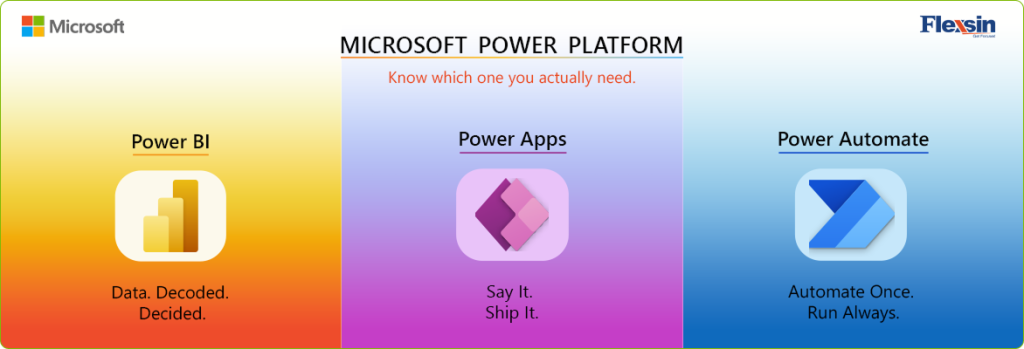
- Power BI is designed for analytics and enterprise reporting
- Power Apps is designed for low-code application development
- Power Automate is designed for workflow automation and process execution
Each platform solves a different operational challenge. Understanding that distinction is what allows enterprises to build scalable systems instead of disconnected software experiments.
Why Enterprises Misunderstand Microsoft Power Platform
Microsoft Power Platform looks unified on the surface because the products share:
- Microsoft 365 connectivity
- common security layers
- Microsoft Dataverse integration
And a similar low-code experience. But internally, each platform operates differently.
A logistics company, for example, may need:
- Operational dashboards for delivery tracking,
- A mobile inspection application for drivers,
- and automated approval workflows for shipment exceptions.
These are three separate business functions:
- Analytics
- Application management, and
- Process automation
Trying to solve all three with a single tool usually results in poor scalability, fragmented user experiences, and rising maintenance costs. That is why successful Power Platform implementation starts with understanding what each platform is fundamentally built to do.
What Power BI Actually Does
Analytics and Decision Intelligence
Power BI is Microsoft’s business intelligence and analytics platform designed to help organizations consolidate data, monitor performance, and transform business information into actionable insights. It enables companies to improve reporting visibility, support strategic decision-making, and analyze operational trends across multiple systems from a centralized reporting environment.
The primary purpose of Power BI integration is to help businesses organize, visualize, and interpret enterprise data efficiently while reducing the complexity associated with fragmented reporting systems and manual spreadsheet-based analysis. Because of its scalable analytics capabilities, both business teams and technical users can collaborate more effectively on reporting, dashboard creation, and performance monitoring.
Organizations commonly use Power BI services to:
- Executive dashboards to provide leadership teams with real-time business visibility
- KPI monitoring for tracking operational, financial, and departmental performance
- Enterprise reporting that consolidates information across business systems
- Data visualization for presenting complex datasets in a more understandable format
- Self-service analytics that enable teams to explore data independently
- Operational analysis for identifying trends, inefficiencies, and business patterns, and
- Centralized reporting environments that improve consistency across departments
Power BI is especially valuable for organizations looking to modernize disconnected reporting processes and improve enterprise-wide access to business intelligence without building custom analytics platforms from scratch.
What Power BI does best:
- Power BI dashboards that deliver centralized performance visibility
- Enterprise reporting solutions for scalable cross-functional reporting
- Enterprise data visualization that simplifies complex business information
- Self-service analytics that empower business users with flexible reporting access
- Real-time dashboards for live operational and executive monitoring,
- Power Query and DAX modeling for advanced data transformation and analysis
- Microsoft Fabric integration for unified analytics and data ecosystem connectivity,
- Connected business intelligence systems that unify reporting across Microsoft and third-party platforms.
Power BI performs especially well when organizations need to consolidate information from multiple systems into a single reporting layer.
What Power BI is not intended for:
- Collect operational inputs
- Replace transactional systems
- Automate business approvals, or
- Function as a workflow engine
It is a reporting and analytics environment – not an operational application framework.
What Power Apps Actually Does
Business Applications Without Traditional Development Cycles
Power Apps is Microsoft’s low-code application development platform designed to help organizations rapidly build business applications with minimal traditional coding. It enables companies to digitize manual processes, improve operational efficiency, and create tailored business solutions without relying entirely on large software development cycles.
Its primary purpose is to help businesses create operational applications quickly while reducing the complexity, cost, and development time associated with traditional enterprise software engineering. Because of its low-code approach, both business users and developers can collaborate more effectively during application development and deployment.
Organizations commonly use Power Apps development for:
- Field operations to enable mobile access for remote teams and technicians,
- Inspections for digital checklists, audits, and compliance reporting,
- Onboarding systems that streamline employee setup and document workflows,
- Inventory tracking for real-time stock management and operational visibility,
- Approvals that simplify internal request and authorization processes,
- Compliance workflows for governance, documentation, and audit management, and
- Custom internal applications tailored to unique operational requirements.
Power Apps integration is especially valuable for organizations looking to modernize legacy paper-based or spreadsheet-driven processes without undertaking large-scale software redevelopment projects.
What Power Apps does best:
- Low-code enterprise apps that accelerate application delivery,
- Custom Power Apps development for department-specific operational needs,
- Power Apps Canvas apps that prioritize flexible and user-friendly interfaces,
- Model-driven Power Apps built around structured business data and enterprise workflows,
- AI Builder in Power Apps for intelligent automation, predictions, and document processing,
- Microsoft Dataverse integration for centralized and secure business data management,
- Connected enterprise systems that integrate applications across Microsoft and third-party platforms.
These capabilities make Power Apps an important component of modern digital transformation solutions, particularly for enterprises seeking agility, scalability, and faster operational innovation.
What Power Apps is not intended for:
- Replace enterprise analytics,
- Manage advanced reporting, or
- Orchestrate large-scale workflow automation independently.
Its role is application delivery.
What Power Automate Actually Does
Process Execution and Workflow Automation
Power Automate is Microsoft’s workflow automation platform designed to help organizations streamline repetitive business processes with minimal manual intervention. It enables companies to automate operational tasks, improve process consistency, and connect systems across departments without relying entirely on complex custom software development.
Its primary purpose is to help businesses automate routine workflows efficiently while reducing the operational delays, errors, and resource overhead associated with manual process management. Because of its low-code automation approach, both business users and technical teams can collaborate more effectively on workflow design, execution, and optimization.
Organizations commonly use Power Automate for:
- Approval workflows that simplify internal request routing and decision-making
- Invoice processing for automated document handling and finance operations
- HR onboarding systems that streamline employee setup and communication workflows
- Automated notifications for real-time alerts, reminders, and operational updates
- Data synchronization across enterprise platforms and connected systems
- File management workflows for document movement, storage, and governance, and
- Legacy system automation that improves efficiency without requiring full system replacement
Power Automate is especially valuable for organizations looking to modernize manual, repetitive, or disconnected operational processes without undertaking large-scale redevelopment initiatives.
What Power Automate does best:
- Business process automation that reduces repetitive manual work
- Enterprise automation for scalable cross-department operational workflows
- Cloud workflow automation that connects systems and services efficiently
- Power Automate desktop flows for automating desktop-based operational tasks
- Intelligent process automation that improves workflow accuracy and efficiency
- Robotic Process Automation for automating legacy and rule-based business activities
- Enterprise workflow management for standardized operational execution and governance
- Connected enterprise systems that automate processes across Microsoft and third-party platforms.
These capabilities make Power Automate integration an important component of modern digital transformation solutions, particularly for enterprises seeking operational efficiency, process scalability, and faster business execution.
What Power Automate is not intended for:
- Replace reporting systems
- Act as a full application platform, or
- Manage enterprise analytics
It automates processes between systems and users.
When to Use Power BI
Power BI is most effective when organizations need centralized visibility into business performance across departments, systems, and operational functions. It helps leadership teams transform large volumes of raw data into actionable insights that support faster and more informed decision-making.
Organizations commonly use Power BI for:
- Executive reporting to monitor business KPIs and strategic objectives
- Operational visibility across departments, locations, and enterprise systems
- Financial dashboards for revenue, budgeting, forecasting, and profitability analysis
- Enterprise data visualization that simplifies complex business information, and
- Centralized analytics that consolidate data from multiple platforms into a unified reporting environment.
Power BI also supports self-service analytics, allowing business users to explore data without depending entirely on technical teams for every reporting requirement. Its integration capabilities make it especially valuable for enterprises operating across multiple cloud and on-premise systems.
Typical business scenarios include:
- Revenue analysis for tracking profitability, sales trends, and customer performance
- Supply chain monitoring to improve inventory management and logistics visibility
- Healthcare reporting for patient operations, compliance tracking, and clinical analytics
- Manufacturing performance tracking to monitor production efficiency and operational KPIs
- Airline operational dashboards for route performance, passenger analytics, and scheduling visibility
- Retail sales intelligence for customer behavior analysis, demand forecasting, and regional performance reporting.
Strong Power BI dashboard development depends more on data architecture quality than on visual design alone. Well-structured semantic models, clean data pipelines, and properly governed reporting frameworks are what ultimately determine the accuracy, scalability, and long-term usability of enterprise reporting solutions.
When to Use Power Apps
Power Apps is most effective when organizations need customized business applications that streamline operational workflows, automate manual processes, and improve employee productivity across departments. It helps businesses rapidly build low-code applications that address specific operational requirements without relying heavily on traditional software development cycles.
Power Apps is most effective when organizations need customized business applications that streamline operational workflows, automate manual processes, and improve employee productivity across departments. It helps businesses rapidly build low-code applications that address specific operational requirements without relying heavily on traditional software development cycles.
Organizations commonly use Power Apps for:
- Operational applications to digitize manual business workflows and internal processes
- Mobile business tools that support field teams, remote employees, and on-the-go operations
- Digital forms for data collection, approvals, inspections, and workflow automation
- Approval interfaces that simplify multi-level business approvals and task management, and
- Custom low-code enterprise apps that integrate with existing Microsoft and third-party systems
Power Apps also supports rapid application development, allowing business teams to create and modify solutions with minimal coding while maintaining enterprise-level governance and security standards. Its integration capabilities make it especially valuable for organizations operating across multiple departments, platforms, and business functions.
Typical business scenarios include:
- Inventory management systems for stock tracking, warehouse visibility, and operational control
- Vendor portals to streamline supplier communication, onboarding, and collaboration processes
- HR onboarding applications for employee documentation, approvals, and workflow automation
- Inspection systems for field audits, quality assurance, and compliance reporting
- Compliance tracking applications to monitor policies, documentation, and regulatory requirements
- Service management applications for ticket handling, task allocation, and operational support workflows
Strong Power Apps development depends more on process architecture, governance strategy, and system integration quality than on interface design alone. Well-structured data models, scalable workflows, and properly governed application frameworks are what ultimately determine the usability, scalability, and long-term success of enterprise Power Apps solutions.
When to Use Power Automate
Power Automate integration becomes especially valuable when organizations want to reduce repetitive operational work, eliminate manual dependencies, and improve process consistency across departments. Instead of relying on employees to manage repetitive approvals, notifications, or data transfers manually, businesses can automate these workflows through connected systems and predefined triggers.
Organizations commonly use Power Automate for:
- Workflow automation to streamline repetitive business activities and reduce manual intervention
- Approval process automation across departments, teams, and enterprise systems
- Data synchronization between multiple applications, cloud services, and operational platforms
- Notification and alert automation that improves responsiveness and process visibility, and
- Business process integration that connects disconnected systems into a unified automated workflow environment
Power Automate integration also supports low-code automation, allowing business users to create workflows without depending entirely on technical teams for every operational requirement. Its integration capabilities make it especially valuable for enterprises operating across multiple Microsoft applications, third-party platforms, and cloud-based environments.
Typical business scenarios include:
- Employee onboarding automation for approvals, documentation, and task assignments
- Invoice processing workflows to improve financial operations and reduce processing delays
- Customer support automation for ticket routing, notifications, and service management
- Compliance workflow automation to monitor approvals, audits, and regulatory processes
- Sales and marketing automation for lead management, follow-ups, and customer engagement activities
- IT service automation for incident management, user requests, and operational support workflows
Strong Power Automate implementation depends more on process architecture quality than on workflow design alone. Well-structured automation logic, reliable system integrations, and properly governed workflow frameworks are what ultimately determine the efficiency, scalability, and long-term success of enterprise Power Automate solutions.
Comparing Power BI, Power Apps & Power Automate
| Capability | Power BI | Power Apps | Power Automate |
| Primary Role | Analytics & reporting | Application creation | Workflow automation |
| Main Business Function | Data visibility | Operational apps | Process automation |
| Best For | Dashboards & KPIs | Forms & business apps | Approvals & repetitive tasks |
| Product Development | Manual research and feedback | AI-driven trend analysis | Faster innovation |
| Low-Code Development | Moderate | Extensive | Extensive |
| Real-Time Dashboards | Yes | Limited | No/td> |
| Enterprise Reporting Solutions | Strong | Minimal | Minimal |
| Business Process Automation | Basic | Moderate | Advanced |
| AI Features | Predictive analytic | AI Builder in Power Apps | AI-powered automation |
| Robotic Process Automation | No | No | Yes |
| Connected Enterprise Systems | Strong | Strong | Strong |
| Microsoft Dataverse Support | Yes | Yes | Yes |
| Mobile Usage | Dashboard access | Full app interaction | Workflow approvals |
| Enterprise Workflow Management | Minimal | Moderate | Extensive |
How the Three Platforms Work Together
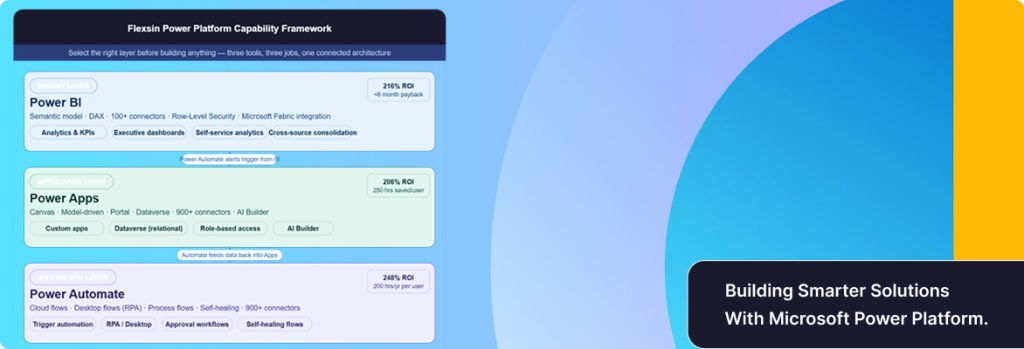
The real strength of Microsoft Power Platform appears when all three layers – analytics, applications, and automation – operate together as a connected business ecosystem. While each platform delivers value independently, organizations typically achieve the highest operational impact when Power BI, Power Apps, and Power Automate are integrated into a single workflow strategy.
A connected workflow may look like this:
- Employees enter operational information through a Power Apps application designed for business-specific processes.
- Power Automate then routes approvals, notifications, escalations, and task assignments automatically based on predefined workflow rules.
- Finally, Power BI dashboards visualize operational performance, workflow efficiency, and business KPIs in real time for leadership teams and stakeholders.
This connected structure creates:
- Better reporting visibility through centralized analytics and real-time dashboards,
- Faster process execution by reducing manual approvals and repetitive administrative tasks,
- Improved operational consistency through standardized workflows and connected enterprise systems, and
- Stronger Power Platform ROI by combining automation, analytics, and low-code applications into a unified operational framework.
The integration between these platforms also improves collaboration across departments by ensuring that data, workflows, and reporting systems remain synchronized. Instead of functioning as standalone tools, the platforms become part of a unified operational ecosystem that supports enterprise automation, digital transformation, and long-term business scalab
Contact Flexsin Technologies for seamless Power Platform integration and customized Power Platform solutions tailored to your business needs. Empower your organization with expert-driven automation, analytics, and application development using Microsoft Power Platform services from Flexsin Technologies.

Why Choosing the Wrong Tool Creates Operational Problems
The most common architectural issue inside Microsoft Power Platform deployments is overextending a tool beyond its intended purpose.
Examples include:
- Building operational reporting entirely inside Power Apps,
- Managing approvals manually through Power BI alerts,
- Attempting to create enterprise-grade applications exclusively through automation flows.
These decisions may appear faster initially, but they create long-term operational friction:
- Performance limitations
- Governance challenges
- Duplicated workflows
- Licensing inefficiencies, and
- Rising support overhead
A properly designed Microsoft Power Platform architecture separates:
- Analytics
- Application management, and
- Automation layers
That separation improves scalability and simplifies maintenance over time.
Common Questions Businesses Ask
1. What is the difference between Power BI and Power Apps?The difference between Power BI and Power Apps is their core purpose. Power BI focuses on analytics and reporting, while Power Apps focuses on application development and operational workflows. Together, they help organizations both understand business performance and improve day-to-day operational execution.
2. Can Power Automate work independently?Yes. Power Automate functions independently as a workflow automation platform. It can automate approvals, notifications, and repetitive tasks even without direct integration with Power BI or Power Apps.
3. What is Microsoft Dataverse used for?Microsoft Dataverse acts as the centralized data layer supporting applications, automation, and integrations across Microsoft Power Platform. It helps organizations maintain consistent, secure, and scalable business data across connected systems.
4. Is Power Platform suitable for enterprise use?Yes. Many enterprises use Microsoft Power Platform services to modernize reporting, automation, and operational processes without replacing core systems. Its low-code architecture also allows faster deployment compared to traditional enterprise software development models.
5. Does Power Platform support AI capabilities?Yes. AI-powered automation, predictive analytics, and AI Builder in Power Apps all contribute to intelligent business operations. These capabilities help organizations reduce manual effort while improving decision-making accuracy and process efficiency.
6. Can Power BI, Power Apps, and Power Automate be used together?Yes. These tools are designed to work as connected components within Microsoft Power Platform. Organizations often use Power Apps for data entry, Power Automate for workflow execution, and Power BI for reporting and analytics.
7. Which industries benefit the most from Microsoft Power Platform?Industries such as healthcare, manufacturing, retail, logistics, finance, and professional services commonly use Microsoft Power Platform for enterprise reporting, low-code application development, and business process automation. The platform is especially valuable for organizations managing large volumes of operational data and repetitive workflows.
