

 +1.844.3539.746
 info@flexsin.com
5 Warning Signs That Tell You Need ERP For Small Businesses
 Tarun Malhotra
Let's talk
Table of Contents:
- The Real Problem Behind Disconnected Tools
- Why Standard Workarounds Fall Short for Growing SMEs
- The 5 Signs You Need ERP For Small Businesses – Examined in Depth
- What We See in ERP Integration for Small Businesses
- Limitations of ERP Implementation for SMEs
- People Also Ask:
- Ready to Know What’s Actually Happening in Your Business?
- Frequently Asked Questions
The Real Problem Behind Disconnected Tools
Most SMEs don’t fail because they lack ambition. They fail because their operational infrastructure stops scaling three stages before their revenue does.
That gap – between what the business is doing and what its systems can handle – is where the real cost lives. It’s not a single catastrophic moment. It’s a slow bleed: a purchase order entered twice, a report that takes four days to compile, a customer complaint that fell through because three people assumed someone else owned it.
ERP for small businesses was built specifically to close that gap. But the trigger for implementation is not arbitrary – it is behavioral. The signs appear in how your people work, how your decisions get made, and how your data flows – or doesn’t.
Why Standard Workarounds Fall Short for Growing SMEs
Excel is a tool, not a system. QuickBooks is an accounting application, not an operational backbone. The combination of a CRM here, an inventory tracker there, and a spreadsheet in between – held together by a weekly export and a prayer – is not a technology stack. It is an accident waiting to happen at scale.
The structural problem with disconnected systems is not complexity – it is latency. By the time data from your warehouse enters your finance system and eventually makes it into a management report, the operational reality it describes no longer exists. Decisions made on stale data are often worse than decisions made on instinct, because they carry false confidence.
According to Panorama Consulting’s 2024 data, 78.6% of organizations implementing new ERP systems chose cloud solutions – up from 64.5% just one year prior. That shift is not driven by vendor marketing. It is driven by SME operators who discovered, at cost, that their legacy workarounds could not keep pace with their growth.
“The business didn’t break on the day we missed a deadline. It broke the day we realized our systems had been lying to us for months.” – A common pattern Flexsin consultants encounter in mid-market SME assessments.
The 5 Signs You Need ERP For Small Businesses – Examined in Depth
Sign 1: Your Data Lives in Five Places and Trusts None of Them
Your sales team has a customer list in HubSpot. Finance is running its own version in QuickBooks. Operations is working from a shared spreadsheet on Google Drive. None of these match. That is not a data-entry problem – it is a structural one, and it signals the disconnected systems business risk that defines the first stage of ERP need.
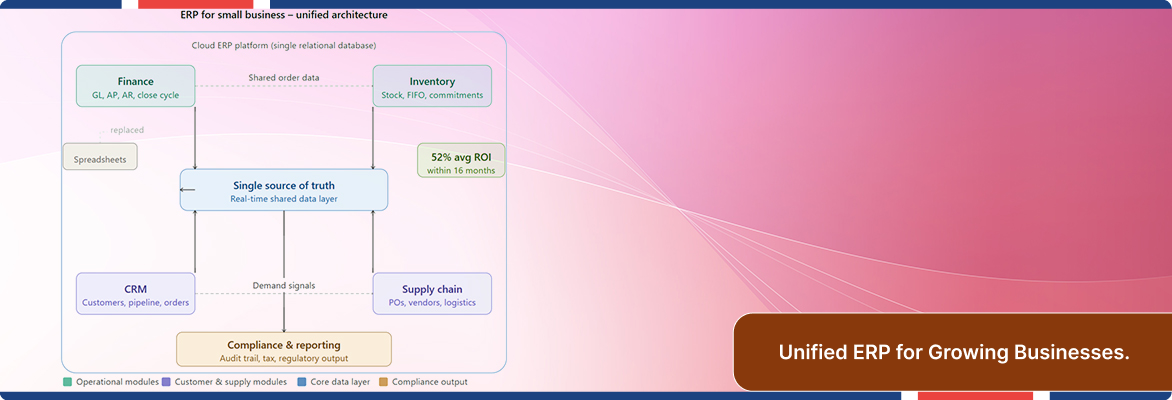
ERP for small businesses consulting resolves this by creating a single database of record – what practitioners call a single source of truth. Every department reads from and writes to the same system. When a sales rep closes a deal, inventory availability updates. When a purchase order clears, cash flow forecasting adjusts. The integration is not cosmetic; it is architectural.
Research from the University of Hawaii found that 88% of spreadsheets contain at least one error – and more recent findings push that figure to 94% in business decision-making contexts. Half of those errors are classified as “material defects”: significant enough to change a business outcome. When those spreadsheets are also your ERP system, the consequences are not theoretical.
- Multiple versions of the same customer record across tools
- Weekly “reconciliation” meetings to align finance and operations data
- Reports that require manual export and assembly from 3+ systems
- Staff uncertainty about which figure is the “real” number
Sign 2: Your Highest-Paid People Are Doing Data Entry
When your operations director spends two hours each Monday reconciling an inventory log, and your CFO re-enters journal entries that should have flowed automatically from a sales system – you have a business process automation ERP problem, even if you’ve never framed it that way.
Manual task burden is one of the most underestimated growth blockers for SMEs. It is invisible on a P&L. It doesn’t show up in a board report. But it compounds: every hour spent on data entry is an hour not spent on customer relationships, product development, or strategic planning.
Automating invoice creation, purchase order workflows, inventory replenishment triggers, and payroll inputs are entry-level capabilities of ERP for small businesses. According to Gartner, more than 65% of organizations now believe AI is critical to their ERP systems – a figure that tells you where business process automation is heading, and why deferring ERP adoption is a compounding cost, not a savings.
- Same data entered into 2 or more systems every week
- Invoice creation is entirely manual with no auto-population from CRM data
- Stock replenishment is decided by a human checking a clipboard
- Month-end close takes more than 5 business days
Sign 3: You Can’t Answer Basic Operational Questions Without a Report Request
Here is a diagnostic question worth taking seriously: How long does it take your business to answer “What is our gross margin by product line this week?” If the answer involves an email to three people and a 48-hour wait, you have a real-time inventory management ERP problem.
The inability to access current operational data is not a reporting limitation – it is a strategic one. Businesses that operate on delayed data make delayed decisions. Competitors operating on live ERP dashboards see demand shifts, inventory shortfalls, and margin compression in real time. They adjust. Your business, still waiting for a report, does not.
ERP vs spreadsheets is not a feature comparison. It is a decision-speed comparison. Modern cloud ERP platforms surface real-time dashboards that update continuously as transactions occur. The gap between knowing and not knowing shrinks to zero.
The inability to answer “What’s our inventory value right now?” is not a reporting gap. It is an existential signal that your systems are no longer fit for purpose.
Sign 4: Growth Is Creating More Chaos, Not More Capacity
Growth is supposed to compound capability. When it compounds confusion instead – when more customers mean more errors, more SKUs mean more stockouts, and more staff mean more coordination overhead – the underlying infrastructure has hit its ceiling.
ERP scalability for small businesses is the structural answer to this inflection point. Unlike point solutions, which require re-implementation every time a business changes shape, ERP platforms are designed to flex: add users, open new locations, activate new modules, integrate new tools – without tearing the architecture down and rebuilding it.
Panorama Consulting’s 2024 data shows that the primary reason organizations cite for buying new cloud ERP for growing businesses is to support growth, ahead of greater functionality and cost reduction. The SMEs that wait until operations are visibly broken are not conservative – they are paying a compounding tax on avoidance.
In India specifically, ERP adoption among SMEs surged 24% between 2022 and 2024, driven by affordable cloud ERP for growing businesses. [NOTE: verify freshness before publishing – source: marketreportsworld.com, April 2026]
- Adding headcount without adding output per head
- Onboarding new customers extends existing bottlenecks rather than absorbing them
- Finance cannot close the month faster despite adding accounting staff
- Sales cycles lengthen because operations cannot commit on delivery timelines
Sign 5: Compliance Is Becoming a Manual Firefight
Regulatory compliance is not static. Tax codes shift. Labor laws update. Sector-specific reporting requirements expand. When compliance depends on someone manually updating a spreadsheet every time a rule changes – your exposure is not hypothetical.
ERP compliance reporting for SMEs embeds audit trails, automated tax calculations, document retention schedules, and regulatory reporting templates directly into the workflow. There is no separate compliance project. The data is clean, timestamped, and traceable because the system enforced it at entry, not retroactively.
This is, in our direct assessment, the most underweighted sign on this list for cloud ERP for growing businesses. SMEs routinely dismiss compliance risk because it hasn’t materialized yet. It is invisible until it isn’t – and when it surfaces, it surfaces as a penalty, an audit, or a contract loss.
- Compliance reports are assembled manually from multiple data sources
- Audit preparation takes days of staff time, every cycle
- A single regulatory change requires updates across multiple disconnected tools
- Tax filing accuracy depends on the judgment of one or two individuals.
What We See in ERP Integration for Small Businesses
Over the course of working with SMEs across manufacturing, distribution, professional services, and retail, the pattern is consistent: the organizations that experience the smoothest ERP transition are not the ones with the most budget. They are the ones who recognized the signs early enough to make a deliberate choice – rather than an emergency one.
As a Microsoft Solutions Partner and certified Microsoft Cloud solutions provider, Flexsin has deployed Dynamics 365 Business Central Development Services at precisely this inflection point. Business Central is, in our direct experience, the ERP platform that closes the distance between SME-scale resource constraints and enterprise-grade operational capability most effectively. It integrates natively with Microsoft 365, Power BI, and Azure, which means SMEs already running Microsoft infrastructure are not adopting a new ecosystem – they are extending one they already own.
What we consistently find in pre-implementation assessments: the true cost of “not having ERP” is almost always higher than the cost of implementing it. The calculation is not complex. Add up the hours your team spends reconciling data, assembling reports, managing manual compliance, and re-entering information across systems. Multiply by fully-loaded labor cost. Compare it to a phased ERP implementation. The math resolves faster than most SME operators expect.
Limitations of ERP Implementation for SMEs
ERP implementation is not a plug-and-play event. The technical and organizational constraints are real, and any advisor who doesn’t surface them in the first conversation is selling, not advising.
-
- Change management is the dominant failure mode: The technology rarely fails. The adoption does. ERP systems require process re-engineering before deployment, not after. SMEs that implement ERP without redesigning workflows first end up with an expensive digital replica of a broken manual process.
-
- Data quality is a prerequisite, not a post-go-live project: Migrating dirty data into a clean ERP system produces a clean system full of dirty data. Data cleansing and governance must precede implementation.
-
- Timeline expectations must be realistic: A focused SME ERP deployment runs 3–9 months. Attempting to compress that window to hit a quarter-end deadline is the single most common implementation risk Flexsin encounters.
-
- Customization debt accumulates fast: Every customization that deviates from the platform’s standard architecture increases upgrade complexity. The discipline to stay close to standard configuration is harder than it sounds when functional teams push for exceptions.
- Integration complexity is underestimated: Legacy systems don’t always have modern APIs. Connecting an ERP to older infrastructure sometimes requires middleware – and middleware creates its own dependency chain.
These are not arguments against ERP integration for small businesses. They are arguments for entering the process with accurate expectations and a competent implementation partner.
People Also Ask:
What does “ERP for small businesses” actually mean? ERP for small businesses is a cloud-based software platform that replaces disconnected tools – spreadsheets, separate accounting software, manual inventory logs – with a single integrated system. Every department operates from the same live data.
How do I know if my SME needs an ERP system right now? If your team spends significant time each week reconciling data across multiple tools, or if you cannot answer basic questions about cash flow, inventory, or margin without assembling a manual report – you need ERP integration SME. The signs you need an ERP system are already costing you money.
How does cloud ERP for growing businesses compare to on-premise systems? Cloud ERP eliminates upfront infrastructure costs and scales on subscription. On-premise ERP offers deeper customization but requires internal IT maintenance. For SMEs, cloud ERP is almost always the right starting architecture – 78.6% of new ERP implementations in 2024 were cloud-based.
What does ERP implementation cost for an SME, and what is the ROI timeline? Cloud ERP typically runs $50–$150 per user per month, with implementation costs of $15,000–$75,000. Most SMEs see positive ERP ROI within 12–24 months when data reconciliation time, manual process cost, and compliance risk are properly accounted for.
How long does ERP implementation take for a small business? A phased SME ERP deployment takes 3–9 months. The shortest timelines belong to SMEs that do data cleansing before implementation begins and stay close to standard platform configuration.
Does ERP software help with regulatory compliance?Yes. Modern ERP compliance reporting for SMEs embeds audit trails, tax automation, and regulatory workflows directly into daily operations. Compliance becomes a byproduct of accurate data entry, not a separate project.
Can ERP scalability handle a business that doubles in size? That is the core design principle of modern cloud ERP. Modules activate as needed. User licenses expand on demand. ERP scalability for small businesses is not theoretical – it is the reason cloud adoption among mid-market SMEs runs at 80% in recent Panorama data.
Ready to Know What’s Actually Happening in Your Business?
Flexsin is a Microsoft Solutions Partner and certified Microsoft Cloud Solution Provider. We help SMEs implement Microsoft Dynamics 365 Business Central – the cloud ERP for growing businesses that integrates natively with Microsoft 365, Power BI, and your existing Microsoft ecosystem.
If three or more of the five signs above describe your business today, our ERP readiness assessment will show you exactly where your operational gaps are, what they’re costing you, and what a phased Dynamics 365 Business Central deployment would look like for your specific environment.
Speak with a Flexsin IT Consulting Company today.
Frequently Asked Questions
1. What is ERP and why does an SME need it?ERP (Enterprise Resource Planning) is a unified software platform that integrates finance, inventory, sales, HR, and operations into a single system. SMEs need it when disconnected tools and manual processes create data errors, slow decisions, and block growth.
2. How do I know when my small business is ready for an ERP system?he clearest signal: your team spends more time reconciling data than acting on it. If you can’t answer basic questions – margin by product, inventory on hand, cash flow this week – without pulling from multiple sources, you’re ready.
3. How does ERP for small businesses compare to continuing with spreadsheets?Spreadsheets are static and error-prone; recent research shows 94% of business-use spreadsheets contain errors. ERP systems deliver a live, single source of truth that updates in real time across every department.
4. What does ERP implementation cost for an SME? Cloud ERP for SMEs typically runs $50–$150 per user per month for SaaS solutions, with implementation costs ranging $15,000–$75,000 depending on complexity and customization. The ROI usually materializes within 12–24 months.
5. How long does it take to implement ERP for a small business?A focused SME deployment typically takes 3–9 months. Phased rollouts by module are faster to go live and easier to manage than a big-bang approach.
6. Does ERP help with regulatory compliance?Yes. Modern ERP systems embed compliance workflows – audit trails, automated tax calculations, document retention, and reporting – that manual processes simply cannot replicate at scale.
7. Can ERP for small businesses scale as the company grows?That is the core design premise of cloud ERP for small businesses. Modules activate as you need them; user licenses expand without re-implementation; integrations with new tools are API-driven, not custom-coded.
